


If you have ever typed code, written a math equation, or formatted a document, you have almost certainly used the curly bracket symbol { }. It looks simple, but this small punctuation mark carries a surprising amount of power across programming, mathematics, writing, and even design.
In this guide, you will learn everything about the curly bracket symbol: its meaning, how to type it on any keyboard, how to copy and paste it instantly, and how it works in Excel, Word, Math, and LaTeX. We have also included ready to use copy and paste symbols, keyboard shortcuts, and answers to the most common questions people search for.
Let’s break it all down in simple, easy to follow sections. 🧠
What Is a Curly Bracket Symbol?
A curly bracket symbol, also called a brace, is a punctuation character shaped like a wavy or curved line. It comes in a pair: the left curly bracket { opens a group, and the right curly bracket } closes it. Together, { } are used to enclose, group, or organize information in text, code, and formulas.
Unlike round brackets ( ) or square brackets [ ], curly brackets usually signal a stronger or more technical form of grouping. That is why they show up so often in programming languages, mathematical set notation, and structured data formats like JSON.
Read Also This Blog: Right Parenthesis Symbol
Curly Bracket Symbol Meaning
At its core, the curly bracket symbol means “these items belong together as one unit.” The exact meaning shifts slightly depending on where it is used:
- In programming, it defines a block of code or a function body 🧩
- In mathematics, it represents a set of numbers or elements 🔢
- In writing, it can indicate an optional word, a note, or a placeholder 📝
- In data formats like JSON, it marks the start and end of an object 💾
- In music and design, it can group notes, sections, or visual elements 🎼
So while the shape stays the same, the curly bracket adapts its role based on context, which is exactly why it is considered one of the most versatile symbols in typography.
Curly Bracket Symbol Copy and Paste

Typing curly brackets can be tricky on some keyboards, especially mobile devices or non English layouts. Below is a ready made table of curly bracket symbols you can copy and paste directly into any document, chat, or website.
| Symbol | Name | Unicode | HTML Code |
|---|---|---|---|
| { | Left Curly Bracket | U+007B | { |
| } | Right Curly Bracket | U+007D | } |
| { | Fullwidth Left Curly Bracket | U+FF5B | { |
| } | Fullwidth Right Curly Bracket | U+FF5D | } |
| ⎨ | Left Curly Bracket Middle Piece | U+23A8 | ⎨ |
| ⎬ | Right Curly Bracket Middle Piece | U+23AC | ⎬ |
| ⎧ | Left Curly Bracket Upper Hook | U+23A7 | ⎧ |
| ⎫ | Right Curly Bracket Upper Hook | U+23AB | ⎫ |
| ⎩ | Left Curly Bracket Lower Hook | U+23A9 | ⎩ |
| ⎭ | Right Curly Bracket Lower Hook | U+23AD | ⎭ |
| { } | Empty Set Braces | U+007B U+007D | {} |
Simply highlight the symbol you need, copy it, and paste it wherever you want. This works across Windows, Mac, Android, and iOS without needing any extra software. ✅
Curly Bracket Symbol On Keyboard
If you prefer typing the symbol directly rather than copying it, here is how to do it on different devices.
How to Type on Windows?
- Standard US keyboard: press
Shift + [for{andShift + ]for}⌨️ - Using Alt codes: hold
Altand type123on the numeric keypad for{, andAltplus125for}🔢 - On a German or European layout, it is often
AltGr + 7for{andAltGr + 0for}🌍
How to Type on Mac?
- Standard US keyboard: press
Shift + [for{andShift + ]for}🍎 - On layouts without dedicated keys, use
Option + Shift + 8for{andOption + Shift + 9for}🧮
How to Type on Mobile?
- On iPhone or Android, open the symbols keyboard, tap
#+=, then look for the{ }icon 📱 - Alternatively, copy the symbol from a table like the one above and paste it into any app ✂️
| Device | Shortcut for { | Shortcut for } |
|---|---|---|
| Windows (US layout) | Shift + [ | Shift + ] |
| Windows (Alt code) | Alt + 123 | Alt + 125 |
| Mac (US layout) | Shift + [ | Shift + ] |
| Mac (Option layout) | Option + Shift + 8 | Option + Shift + 9 |
| Mobile keyboard | Tap #+= then { | Tap #+= then } |
Curly Bracket Symbol In Excel
Many people assume Excel does not support curly brackets, but they actually play an important role in the software.
- Array formulas: When you press
Ctrl + Shift + Enterafter typing a formula, Excel automatically wraps it in curly brackets to show it is an array formula, for example{=SUM(A1:A5*B1:B5)}📊 - Manual typing: You should never type the curly brackets yourself for array formulas. Excel adds them automatically once you use the correct shortcut
- Custom number formatting: Curly brackets are sometimes used inside custom format codes for special display rules 🧾
Trying to type { directly into a formula bar as a literal character usually causes an error unless it is part of an array formula or text string, so always let Excel generate it automatically when needed.
Curly Bracket Symbol In Math
Mathematics is where the curly bracket symbol truly shines. It has several dedicated meanings depending on the branch of math being used.
- Set notation: Curly brackets group elements of a set, such as
{1, 2, 3, 4}representing four numbers 🧮 - Empty set:
{}or∅represents a set with no elements at all - Piecewise functions: A large curly bracket groups multiple conditions of a function into one definition
- Systems of equations: Brackets can group two or more equations that must be solved together
- Sequences: Curly brackets denote a general sequence, like
{aₙ}
| Math Context | Example | What It Represents |
|---|---|---|
| Set of numbers | {2, 4, 6, 8} | A finite set with four elements |
| Empty set | {} | A set containing zero elements |
| Piecewise function | f(x) = {x² if x≥0, -x if x<0} | Conditional rules grouped together |
| System of equations | {x+y=5, x-y=1} | Equations solved as one system |
Curly Bracket Symbol In Word
Microsoft Word gives you multiple ways to insert curly brackets depending on how you want to use them.
- Type directly using
Shift + [andShift + ]on a standard keyboard ⌨️ - Use the Insert tab, click Symbol, then More Symbols, and search for “left curly bracket” or “right curly bracket” 🔍
- Use the Equation Editor if you need a large, stretchable curly bracket that spans multiple lines of text, which is common for grouping equations or listing conditions 📐
- Use Word’s AutoCorrect feature to create a shortcut if you type curly brackets often
For document formatting, curly brackets are frequently used to mark optional text, group related items in a table, or highlight a placeholder that a reader needs to fill in.
Curly Bracket Symbol PNG

If you need a curly bracket as an image file rather than a text character, PNG versions are useful for design projects, presentations, and social media graphics.
- Transparent background PNGs are best for layering the symbol over other design elements 🖼️
- Vector based SVG files scale better than PNG if you plan to resize the symbol significantly
- You can create your own by typing the symbol in a design tool like Canva or Photoshop and exporting just that character as an image
- Free icon libraries often include stylized curly bracket icons for coding themed graphics or tech branded content
When downloading any curly bracket PNG, check the license terms, since some icon sets require attribution or are limited to non commercial use.
Curly Bracket Symbol In LaTeX
LaTeX is where curly brackets take on a completely different job compared to everyday writing. In LaTeX, curly brackets are primarily used as grouping characters for commands rather than visible symbols.
\{and\}are the commands used to actually display a curly bracket in your output, since plain{and}are reserved for LaTeX syntax- To create a large, stretchable curly bracket that adjusts to the height of an equation, use
\left\{and\right\} - For grouping piecewise functions, LaTeX users commonly rely on the
casesenvironment, which automatically adds a large curly bracket on the left side
Here is a simple example of LaTeX syntax for a set:
$\{1, 2, 3, 4\}$This renders as a properly formatted set with visible curly brackets, which is essential for anyone writing academic papers, math homework, or technical documentation.
Types of Curly Bracket Symbols
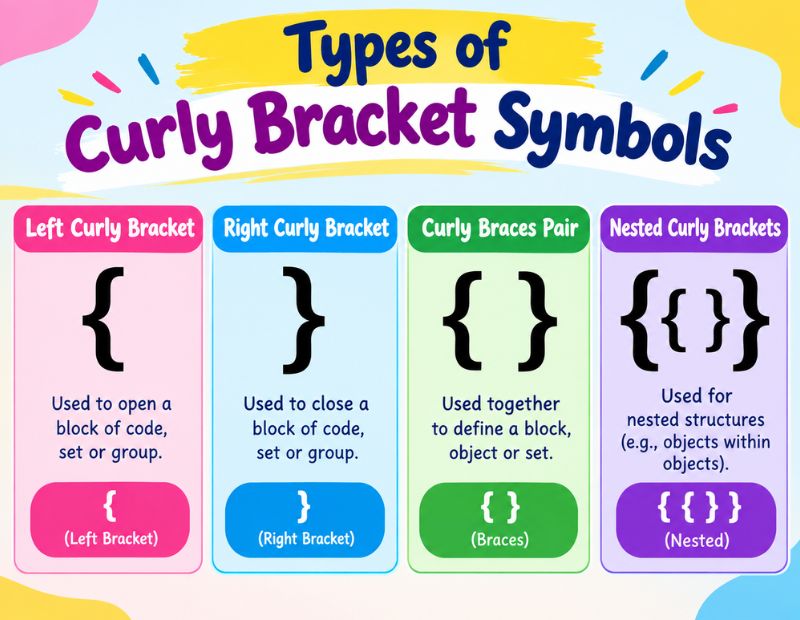
Curly brackets are not one size fits all. Depending on the platform and design need, you may come across several variations.
Right Curly Bracket Symbol
The right curly bracket } closes a group that was opened earlier. It always appears at the end of a block, set, or expression and signals that the grouping is complete.
Left Curly Bracket Symbol
The left curly bracket { opens a group or block. It is always the first character used when starting a set, function, or code block, and it must be paired with a matching right curly bracket.
Big Curly Bracket Symbol
A big or large curly bracket stretches vertically to span multiple lines. It is commonly used in math for piecewise functions or systems of equations, where several conditions need to be visually grouped under one bracket.
Open Curly Bracket Symbol
“Open curly bracket” is simply another name for the left curly bracket {. It marks the beginning of a grouped section of text, code, or numbers.
Close Curly Bracket Symbol
“Close curly bracket” refers to the right curly bracket }. It marks the end of whatever was opened, and in programming, a missing close bracket is one of the most common syntax errors.
Horizontal Curly Bracket Symbol
A horizontal curly bracket is rotated 90 degrees so it curves sideways instead of vertically. It is often used in diagrams, infographics, and labeled charts to group a horizontal range of items, such as a row of labels or a timeline segment.
15+ Powerful Uses and Meanings of the Curly Bracket Symbol
Here is a complete list of where and why the curly bracket symbol is used across different fields:
- Grouping code blocks in programming languages like Java, C++, and JavaScript 💻
- Defining functions and loops in most modern programming syntax 🔁
- Representing sets in mathematics 🔢
- Showing piecewise functions with multiple conditions 📐
- Enclosing objects in JSON data structures 🗂️
- Marking optional or variable text in writing and templates ✍️
- Creating array formulas automatically in Excel 📊
- Grouping equations in LaTeX documents 📄
- Indicating placeholders in mail merge templates 📧
- Framing decorative text in social media bios 🎨
- Labeling grouped items in diagrams and infographics 📈
- Denoting a sequence of terms in mathematics 🔗
- Organizing configuration files in software development ⚙️
- Highlighting musical sections or grouped notes in sheet music 🎵
- Structuring data in APIs and web development requests 🌐
- Adding stylistic flair to usernames and nicknames online 😎
- Grouping multiple choices or conditions in technical writing 📋
Curly Bracket vs Other Bracket Symbols
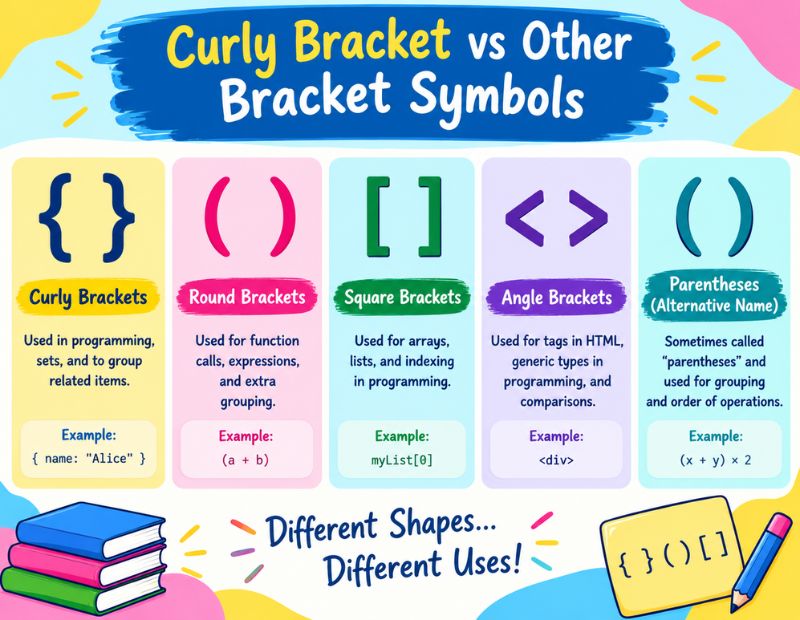
It helps to compare curly brackets with other common bracket types so you know exactly when to use each one.
| Bracket Type | Symbol | Common Use |
|---|---|---|
| Curly Bracket (Brace) | { } | Sets, code blocks, JSON objects, grouped conditions |
| Round Bracket (Parenthesis) | ( ) | Additional information, function arguments, math order of operations |
| Square Bracket | [ ] | Lists, array indexing, optional items in technical writing |
| Angle Bracket | < > | HTML tags, comparison operators, generics in programming |
Understanding this difference helps avoid confusion, especially in coding and mathematics where using the wrong bracket type can cause errors.
Conclusion
The curly bracket symbol { } may look like a small detail, but it plays a major role across coding, math, writing, and design. From grouping code blocks and mathematical sets to formatting documents in Word and Excel, this humble symbol keeps information organized and easy to read.
Whether you need to copy and paste a curly bracket instantly, type one using a keyboard shortcut, or understand how it behaves in LaTeX and Excel, this guide covers everything you need in one place. Bookmark this page so you always have a quick reference whenever you need a curly bracket symbol. 🔖
FAQs
What is the curly bracket symbol called?
It is officially called a “brace,” though most people simply call it a curly bracket or curly brace.
How do I type a curly bracket on my keyboard?
Press Shift plus the square bracket key [ or ] on most English keyboards, or use Alt codes 123 and 125 on Windows.
What does a curly bracket mean in math?
In math, curly brackets typically represent a set of numbers or group multiple conditions in a piecewise function.
Can I copy and paste a curly bracket symbol?
Yes, you can copy any curly bracket symbol from the tables in this guide and paste it directly into documents, chats, or websites.
Why does Excel add curly brackets automatically?
Excel adds curly brackets around a formula when you enter it as an array formula using Ctrl plus Shift plus Enter.
How do I make a curly bracket in LaTeX?
Use the commands \{ and \} since plain curly brackets are reserved for LaTeX’s internal grouping syntax.
What is the difference between a curly bracket and a square bracket?
Curly brackets usually group sets, code blocks, or conditions, while square brackets are more common for lists and array indexing.
Is there a big curly bracket symbol for grouping multiple lines?
Yes, a big or stretchable curly bracket is commonly used in math equations and can be created in Word or LaTeX using the equation editor tools.
