

Meta title: Hyphen Symbol (-): Meaning, Types, Keyboard Shortcuts & Copy and Paste
Meta description: Learn the hyphen symbol meaning, how to type it on any keyboard, how it differs from dashes and minus, plus 15+ types you can copy and paste.
URL slug: /hyphen-symbol
Research note: I reviewed the current top results for this topic, including Computer Hope, Grammarist, Editage, EditorNinja, Rephrasely, PM Proofreading, SJSU Writing Center, and Unicode reference pages. They share a pattern: a short definition, a hyphen vs en dash vs em dash comparison table, keyboard instructions, copy and paste blocks, and a FAQ. This article follows that pattern, then adds more depth on math, Unicode, URLs, and Hindi usage. Everything below is written fresh in my own words.
The hyphen symbol (-) is the short horizontal line on your keyboard, right next to the zero key. It joins words, splits words at the end of a line, and works as a minus sign in many programs.
Most people use it every day without thinking about it. But the hyphen has cousins like the en dash, em dash, minus sign, and underscore, and mixing them up causes real mistakes in writing, coding, and even website URLs.
This guide covers the hyphen symbol meaning, keyboard shortcuts, math use, Unicode types, and ready-to-copy characters. Use the table of contents below to jump to any section.
Quick Copy Box: Hyphen Symbols
Select and copy any symbol you need:
– ‐ ‑ − – — ― ⁃ ﹣ - ﹘ 〜 ~ ゠ ⸗ ⹀ _
(The last one is a soft hyphen. It stays invisible until a word breaks across lines.)
Hyphen Symbol Meaning
A hyphen is a punctuation mark that links two or more words so they act as one idea. It also shows that a word has been broken across two lines.
In simple terms, the hyphen says, “These parts belong together.”
Compare these two phrases:
- A man eating shark (a man is eating a shark)
- A man-eating shark (a shark that eats people)
One small line changes the whole meaning. That is why the hyphen matters.
Core Meanings of the Hyphen
The hyphen symbol carries several jobs:
- Joining: connects words into compounds, like mother-in-law.
- Splitting: marks a word broken at a line end, like punc-tuation.
- Clarifying: separates confusing prefixes, like re-sign (sign again) vs resign (quit).
- Counting: links spelled-out numbers, like thirty-five.
- Subtracting: acts as a minus sign in code and spreadsheets.
- Separating: divides parts of phone numbers, codes, and IDs.
Read Also This Blog: Swan Symbol
Hyphen Symbol Text
When people search for “hyphen symbol text,” they usually want the plain text version they can type or paste into a bio, caption, form, or document.
The standard text hyphen looks like this: –
Behind the scenes, computers store it as a character with a specific code. The everyday one is called the hyphen-minus, and its Unicode value is U+002D. A separate true hyphen character also exists at U+2010 (‐), and it looks almost identical.
| Property | Hyphen-Minus | True Hyphen |
|---|---|---|
| Symbol | – | ‐ |
| Unicode | U+002D | U+2010 |
| HTML code | – | ‐ |
| Found on keyboard | Yes | No |
For daily writing, the keyboard version is all you need.
Hyphen Symbol Copy and Paste
Sometimes you cannot type a symbol, or your keyboard layout is missing it. Copy and paste solves that.
How to Copy and Paste a Hyphen?
- Highlight the symbol you want from the list below.
- Press Ctrl + C (Windows) or Command + C (Mac).
- Click where you want it.
- Press Ctrl + V or Command + V.
On a phone, press and hold the symbol, tap Copy, then long-press in your text box and tap Paste.
Copy and Paste Hyphen Symbol List
| Symbol | Name | Unicode | Best For |
|---|---|---|---|
| – | Hyphen-minus | U+002D | Everyday typing, URLs, code |
| ‐ | Hyphen | U+2010 | Typographic text |
| ‑ | Non-breaking hyphen | U+2011 | Phone numbers, codes that must not split |
| − | Minus sign | U+2212 | Math equations |
| – | En dash | U+2013 | Ranges like 10–20 |
| — | Em dash | U+2014 | Strong breaks in a sentence |
| ― | Horizontal bar | U+2015 | Quotation dashes |
| ⁃ | Hyphen bullet | U+2043 | List bullets |
| ﹣ | Small hyphen-minus | U+FE63 | Compact text styles |
| - | Fullwidth hyphen-minus | U+FF0D | East Asian text |
| 〜 | Wave dash | U+301C | Japanese ranges |
| ~ | Fullwidth tilde | U+FF5E | Japanese and Chinese text |
| ゠ | Katakana double hyphen | U+30A0 | Japanese katakana |
| ⸗ | Double oblique hyphen | U+2E17 | Old German and medieval texts |
| ⹀ | Stenographic double hyphen | U+2E40 | Specialized typography |
| _ | Underscore | U+005F | File names, usernames |
That is 16 different characters, and each has a real purpose.
Hyphen Symbol on Keyboard
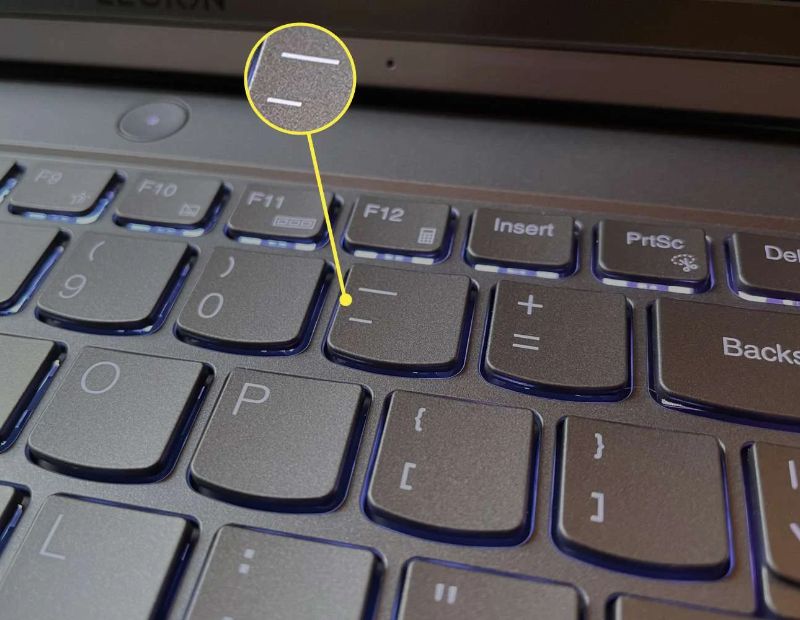
The hyphen is one of the easiest symbols to type.
Windows and Mac Keyboard Shortcuts
| Device | How to Type | Result |
|---|---|---|
| Windows or Mac | Press the – key (top row, right of 0) | Hyphen |
| Windows | Hold Alt, type 45 on the numpad | Hyphen |
| Windows | Hold Alt, type 0150 | En dash |
| Windows | Hold Alt, type 0151 | Em dash |
| Mac | Option + – | En dash |
| Mac | Option + Shift + – | Em dash |
| Windows or Mac | Shift + – | Underscore |
| Numeric keypad | – key | Minus or hyphen |
On a Phone or Tablet
- Open any text field.
- Switch to the numbers or symbols layout (usually labeled 123 or sym).
- Tap the – key.
- Long-press it on many keyboards to see en dash and em dash options.
In Word and Google Docs
Both programs often convert a typed double hyphen into an em dash automatically. If you do not want that, undo the change right after it happens with Ctrl + Z.
Hyphen Symbol in Math
In math, the short line (-) works as a minus or subtraction sign.
- Subtraction: 9 – 4 = 5
- Negative numbers: -7
- Algebra: x – y
Strictly speaking, the correct math symbol is the true minus sign (−), which is slightly longer and sits at the same height as a plus sign. But almost every calculator, spreadsheet, and programming language accepts the plain keyboard hyphen as minus.
Where the Hyphen Acts as Minus?
| Place | Example |
|---|---|
| Calculator | 50 – 12 |
| Excel or Google Sheets | =A1-B1 |
| Python or JavaScript | total = price – discount |
| Temperature | -5°C |
One warning: if you paste a true minus sign (−) into a code editor, it may cause an error because the program expects the keyboard hyphen.
Hyphen Minus Symbol
The hyphen minus symbol is the character on your keyboard. Early computers had very little space for characters, so engineers merged the hyphen and the minus into a single key. That shared character is still called hyphen-minus today.
Because of this, one key does two jobs:
- In writing, it works as a hyphen.
- In math and code, it works as a minus.
The hyphen-minus is also used in command-line flags, such as -help or -v, where it signals an option.
Double Hyphen Symbol
The double hyphen symbol (–) means two hyphens typed one after another. It has several uses:
- Command-line options:
--version,--help - Replacing an em dash: many typists write — when they cannot type a true em dash
- SQL comments: in SQL, — starts a comment line
- Decrement operator: in programming,
x--lowers a value by one
There is also a true single character for it. In Japanese, the katakana double hyphen (゠) is used between words. Old German texts used the double oblique hyphen (⸗).
In regular writing, avoid typing two hyphens when you need a dash. Use the proper dash character instead.
Long Hyphen Symbol
A long hyphen is not really a hyphen. It is a dash. There are two common long versions:
- En dash (–): about the width of the letter N
- Em dash (—): about the width of the letter M
People often call them “long hyphens” in searches, which is why this phrase is popular. If you want a longer line, copy one of these:
– — ―
For a very long line, some people use the horizontal bar (―) or repeat the em dash, though repeating it is mostly used in decorative text rather than formal writing.
Dash and Hyphen Symbol
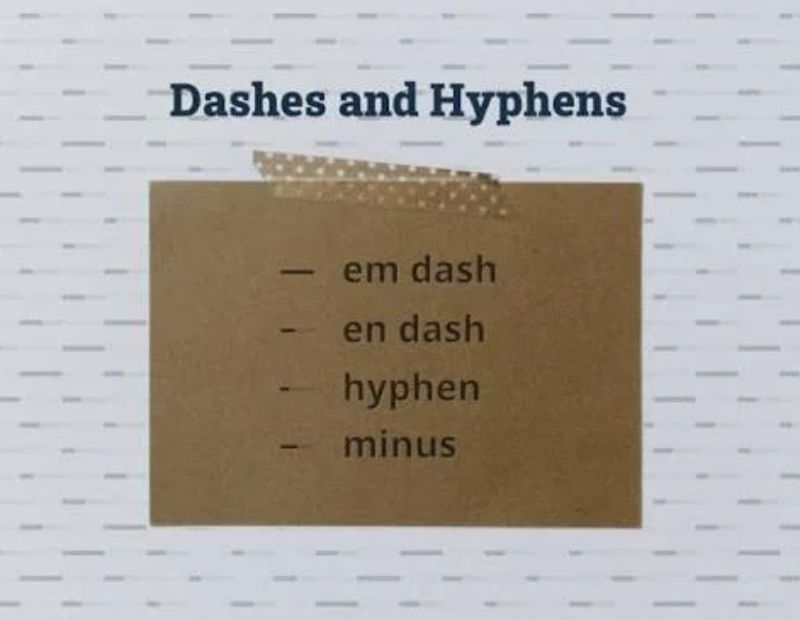
Many readers confuse the dash and hyphen symbol. Here is the clearest way to separate them.
Hyphen vs En Dash vs Em Dash
| Mark | Symbol | Length | Main Job | Example |
|---|---|---|---|---|
| Hyphen | – | Shortest | Joins words | well-known author |
| En dash | – | Medium | Ranges and links | pages 10–25 |
| Em dash | — | Longest | Breaks and emphasis | She won—finally! |
| Minus | − | Medium | Math subtraction | 8 − 3 |
A Simple Memory Trick
- Hyphen = connects (a small bridge)
- En dash = to (from one thing to another)
- Em dash = pause (a breath in the sentence)
Hyphen Symbol Em Dash
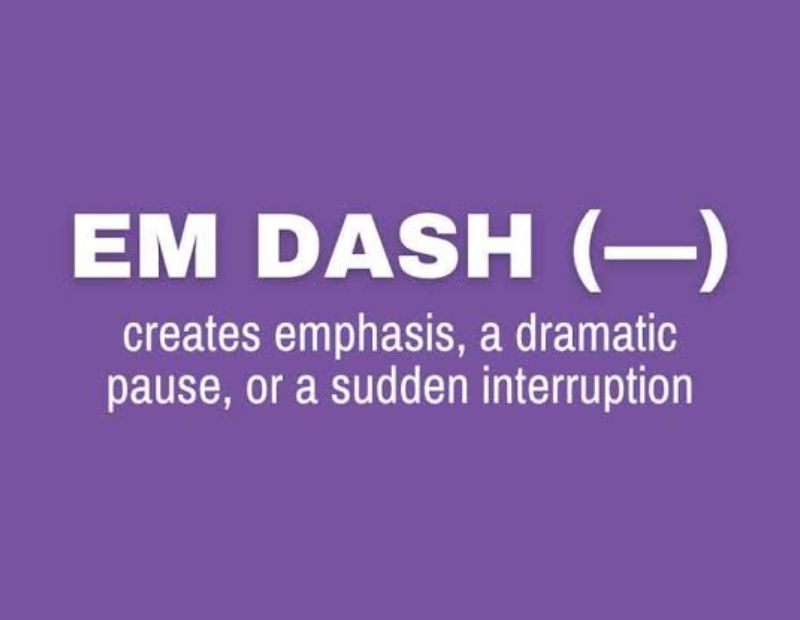
The phrase “hyphen symbol em dash” usually means someone wants to know how the two differ or how to turn a hyphen into an em dash.
The hyphen joins parts of a word. The em dash separates parts of a sentence. They are not interchangeable.
Correct hyphen: a high-quality camera
Correct em dash: The camera was excellent—better than I expected.
In American style, the em dash has no spaces around it. In British style, writers often use a spaced en dash instead. Pick one style and stay consistent.
Use em dashes sparingly. Too many make writing feel choppy. A comma, colon, or pair of parentheses often works just as well.
Wavy Hyphen Symbol
The wavy hyphen symbol is not a hyphen at all, but people search for it often. It is a wavy line used to show ranges, approximations, or decoration.
| Symbol | Name | Typical Use |
|---|---|---|
| ~ | Tilde | Approximation, like ~50 |
| 〜 | Wave dash | Japanese ranges, like 9時〜17時 |
| ~ | Fullwidth tilde | East Asian typing |
| ˜ | Small tilde | Accents |
On a standard keyboard, press Shift + ` (the key left of 1) to type a tilde.
Underscore Hyphen Symbol
The underscore (_) and hyphen (-) share the same key on most keyboards. Hold Shift to get the underscore.
They look alike but work differently:
| Feature | Hyphen (-) | Underscore (_) |
|---|---|---|
| Position | Middle of the line | Bottom of the line |
| Search engines read it as | A word separator | Often a joiner |
| Best for URLs | Yes | No |
| Best for file names | Yes | Yes |
| Best for usernames | Sometimes | Often |
For website addresses, always choose the hyphen. Search engines generally treat hyphens as spaces between words, so hyphen-symbol-guide reads as three words. Underscores can make the words run together.
Hyphen Mark Symbol
“Hyphen mark symbol” is just another name for the punctuation mark itself. You may also hear it called:
- Hyphen sign
- Dash mark (informal)
- Short dash
- Joining mark
- Hyphenation mark
Whatever the name, it points to the same short horizontal line (-).
Hyphenated Symbol
A hyphenated symbol or hyphenated word is one that contains a hyphen. Knowing when to hyphenate is the real skill.
When to Use a Hyphen
- Compound adjectives before a noun: a long-term plan, a five-star hotel
- Spelled-out numbers from 21 to 99: twenty-one, ninety-nine
- Fractions used as adjectives: a two-thirds majority
- Certain prefixes: ex-wife, self-care, all-inclusive
- Prefix before a proper noun: pre-Islamic, anti-American
- Clarity: co-op vs coop
- Line breaks: splitting a long word between syllables
When NOT to Use a Hyphen
- After adverbs ending in -ly: a highly skilled worker (no hyphen)
- When the compound comes after the noun: The plan is long term (usually no hyphen)
- With most common prefixes: rework, unhappy, postwar
Hyphen ka Symbol
Many Hindi and Urdu speakers search for “hyphen ka symbol.” The answer is simple: the symbol is the same short line (-).
In Hindi, the hyphen is called योजक चिह्न (yojak chinh). It is used to join two words or show a relationship between them. In Hindi grammar it appears in compound words (samas) and in pairs of repeated words.
Hindi examples:
- माता-पिता (mata-pita, parents)
- भाई-बहन (bhai-behen, brother and sister)
- दिन-रात (din-raat, day and night)
- धीरे-धीरे (dheere-dheere, slowly)
In Roman Urdu or Hinglish writing, the hyphen works the same way as in English. You type it with the same keyboard key.
10 Examples of Hyphen Symbol
Here are ten clear examples across different situations:
- Compound word: My mother-in-law is visiting.
- Compound adjective: It was a well-written report.
- Number: She turned twenty-five today.
- Prefix: He is my ex-boss.
- Clarity: Please re-sign the form. (sign it again)
- Phone number: 555-0142
- Line break: The meeting was un-
expectedly long. - URL: www.example.com/best-hyphen-guide
- Math or code: 100 – 25 = 75
- Suspended hyphen: We offer two- and three-bedroom homes.
Types of Hyphen Symbols at a Glance
Here is a quick summary of the most useful types:
- Hyphen-minus (-)
- True hyphen (‐)
- Non-breaking hyphen (‑)
- Soft hyphen (invisible)
- Minus sign (−)
- En dash (–)
- Em dash (—)
- Horizontal bar (―)
- Hyphen bullet (⁃)
- Small hyphen-minus (﹣)
- Fullwidth hyphen-minus (-)
- Wave dash (〜)
- Double hyphen (–)
- Katakana double hyphen (゠)
- Double oblique hyphen (⸗)
- Underscore (_)
What Is a Soft Hyphen?
A soft hyphen is invisible until a word has to break at the end of a line. Then it appears as a normal hyphen. Web designers use it to control how long words wrap on small screens. In HTML, you write it as ­.
What Is a Non-Breaking Hyphen?
A non-breaking hyphen stops a word or code from splitting across two lines. It is helpful for phone numbers, product codes, and names like Jean-Luc.
Hyphen Symbol in SEO, Web Design, and Coding
The hyphen has a quiet but important role online.
Hyphens in URLs
Search engines read hyphens as word separators. That is why clean URLs look like this:
- Good:
/hyphen-symbol-copy-paste - Weaker:
/hyphen_symbol_copy_paste - Weaker:
/hyphensymbolcopypaste
Hyphens in Image File Names
Name images with hyphens too, such as hyphen-vs-dash-chart.jpg. It helps both readers and search engines understand the file.
Hyphens in CSS and HTML
- CSS properties use hyphens:
font-size,background-color - Class names often use hyphens:
main-menu,blog-title - The CSS rule
hyphens: auto;lets a browser break long words for you
Hyphens in Programming
Many languages do not allow hyphens inside variable names because the computer reads them as minus. Use an underscore or camelCase instead. For example, write total_price, not total-price.
Common Hyphen Mistakes to Avoid
Even experienced writers slip up. Watch for these:
- Using a hyphen for ranges: write 10–20 with an en dash in formal text.
- Using a hyphen as a dash: write “Wait—stop!” not “Wait – stop!”
- Adding a hyphen after -ly adverbs: write newly built, not newly-built.
- Overusing hyphens: if a phrase reads fine without one, leave it out.
- Copying minus signs into code: this can break scripts.
- Mixing styles: pick either American or British dash style and keep it steady.
Frequently Asked Questions About the Hyphen Symbol
What is the hyphen symbol?
The hyphen symbol is the short horizontal line (-) used to join words or split a word at a line break.
How do I type a hyphen on a keyboard?
Press the key to the right of the zero on the top row. On a phone, open the symbols layout and tap the line.
What is the difference between a hyphen and a dash?
A hyphen joins words, while a dash separates parts of a sentence or shows a range. Dashes are longer than hyphens.
What is the shortcut for an em dash?
On Windows, hold Alt and type 0151. On Mac, press Option + Shift + hyphen.
Is a hyphen the same as a minus sign?
Not exactly. The true minus (−) is a separate math character, but computers accept the keyboard hyphen as minus.
What is a double hyphen used for?
It is used in command-line options, code comments, and as a stand-in for an em dash.
Can I copy and paste a hyphen symbol?
Yes. Highlight the symbol, press Ctrl + C, then paste it with Ctrl + V.
What is the long hyphen called?
It is called a dash. The two long versions are the en dash (–) and the em dash (—).
What is the wavy hyphen symbol?
It is usually a tilde (~) or a wave dash (〜), used for approximate values or ranges.
Should I use hyphens or underscores in URLs?
Use hyphens. Search engines treat them as word separators, which helps readability and SEO.
What is a hyphenated word?
It is a word made of two or more parts joined by a hyphen, like well-known or self-care.
What is hyphen ka symbol in Hindi?
It is called योजक चिह्न (yojak chinh) and looks like a short line (-).
What is a soft hyphen?
A soft hyphen is an invisible character that only shows up when a word must break across lines.
What is the difference between a hyphen and an underscore?
A hyphen sits mid-height and separates words, while an underscore sits at the bottom of the line and often joins them.
Is the hyphen the same as the hyphen-minus?
In everyday use, yes. The hyphen-minus is the single keyboard character that serves as both.
Conclusion
The hyphen symbol (-) is small, but it carries a lot of weight. It joins words, clears up meaning, splits long words, and doubles as a minus sign in math and code. Once you know how it differs from the en dash, em dash, minus sign, and underscore, your writing becomes sharper and more professional.
Keep the quick copy box and the symbol tables from this guide handy. Whenever you need a particular character, you can copy it in seconds. And remember the simple rule: use the hyphen to connect words, the en dash for ranges, and the em dash for dramatic pauses.
