

Meta title: Diameter Symbol (⌀): Meaning, Alt Code, Unicode & Copy and Paste
Meta description: Learn the diameter symbol meaning, Alt code, Unicode, and shortcuts for Word, Excel, AutoCAD and SolidWorks. Copy and paste ⌀ in one click.
URL slug: /diameter-symbol
Research note: I reviewed the current top results for this topic, including Autodesk’s AutoCAD blog, ExcelDemy, Bricks, Unicode reference pages, and several keyboard shortcut guides. They share a clear pattern: a one line definition, a copy box, an Alt code table, software specific steps (Word, Excel, CAD), a Unicode table, and a short FAQ. This article follows that pattern and adds more depth on engineering use, symbol mix ups, and drawing standards. The wording is original. I also found that several top pages wrongly say Alt + 0216 gives the true diameter sign. It actually gives Ø. I explain the difference below.
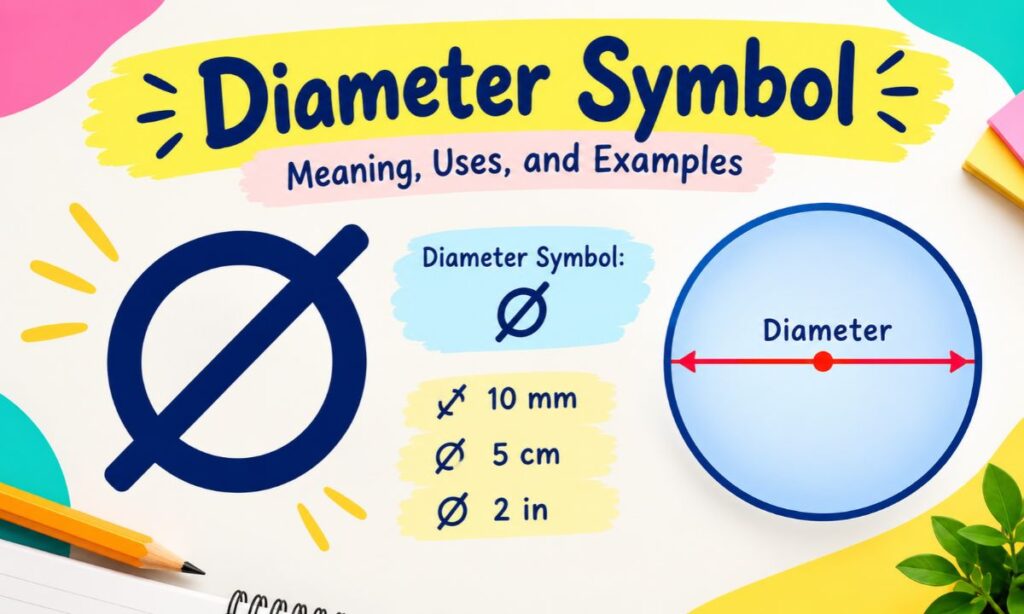
The diameter symbol (⌀) is a circle with a slanted line through it. It tells you that the number after it is the width of a circle, hole, rod, pipe, or sphere measured straight through the center.
You will see it on engineering drawings, machine parts, tool packaging, and technical documents. The trouble is that no standard keyboard has a key for it.
This guide fixes that. You will learn the diameter symbol meaning, the exact Alt code, Unicode value, and step by step methods for Windows, Mac, Word, Excel, AutoCAD, and SolidWorks. You can also copy and paste the symbol right away.
Quick Copy Box: Diameter Symbols
Select and copy the one you need:
⌀ Ø ø ∅ Φ φ ϕ ⊘
The first one, ⌀, is the true diameter sign. The others are look alikes that people often use as substitutes.
Diameter Symbol Meaning
The diameter symbol means “the diameter of.” It marks the distance across a circle that passes through its center point.
For example, ⌀25 on a drawing means the part is 25 units wide across its circular section. The unit is usually millimeters or inches, depending on the drawing.
Why the Symbol Matters?
Without it, a number on a drawing is unclear. A reader would not know if 25 is a length, a radius, or a width. The symbol removes that doubt in one character.
Key Facts at a Glance
- It looks like an empty circle with a diagonal slash.
- It is placed before the number, not after it.
- It is used in engineering, manufacturing, architecture, and machining.
- It applies to circles, cylinders, holes, shafts, spheres, and pipes.
- Standards such as ISO and ASME drawing rules use it for dimensions and tolerances.
Read Also This Blog: Hyphen Symbol
Diameter of a Circle Symbol
The diameter of a circle is a straight line that runs from one edge to the opposite edge through the center. In geometry, it is often written as d or D. In technical drawings, it is written with the symbol ⌀.
| Context | How Diameter Is Written | Example |
|---|---|---|
| Geometry class | d or D | d = 10 cm |
| Technical drawing | ⌀ | ⌀10 |
| Text abbreviation | dia. or DIA | 10 mm dia. |
| Pipe sizing | DN or NPS | DN 50 |
Circle Diameter Symbol and Formula
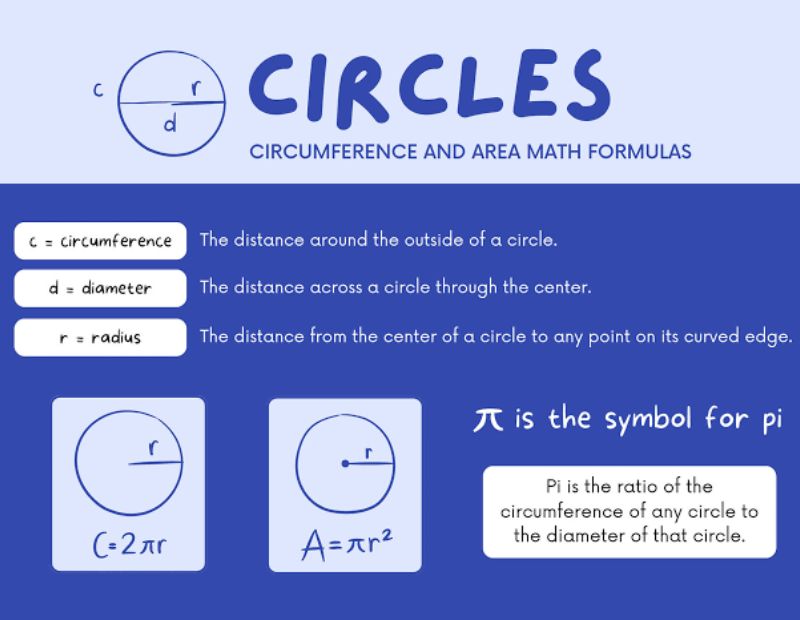
The circle diameter symbol links to simple formulas:
- Diameter = 2 × radius (d = 2r)
- Circumference = π × diameter (C = πd)
- Area = π × (d ÷ 2)²
These are the same ideas used on a drawing. The symbol just shows the value in a compact way.
Diameter Symbol Text
When people search for “diameter symbol text,” they want a version they can type or paste into a document, caption, or product listing.
The text version looks like this: ⌀
It is a standard Unicode character, so it works in most modern apps, websites, and fonts. If you see an empty box or a question mark, the font does not support it. Switch to a font like Arial Unicode MS, Segoe UI Symbol, or Cambria Math.
Diameter Symbol Copy and Paste

Copy and paste is the fastest method. Nothing to memorize.
Steps
- Highlight the symbol: ⌀
- Press Ctrl + C on Windows or Command + C on Mac.
- Click where you want it.
- Press Ctrl + V or Command + V.
On a phone, press and hold the symbol, tap Copy, then long press in your text box and tap Paste.
Copy and Paste List
| Symbol | Name | Best Used For |
|---|---|---|
| ⌀ | Diameter sign | Official diameter marking |
| Ø | Capital O with stroke | Common substitute |
| ø | Small o with stroke | Lowercase substitute, Nordic text |
| ∅ | Empty set | Math sets (often misused) |
| Φ | Capital Greek phi | Used for diameter in some regions |
| φ | Small Greek phi | Math and physics |
How to Type a Diameter Symbol?
There are six reliable ways to type it. Pick the one that matches your device.
- Copy and paste from this page.
- Alt code on a Windows numeric keypad.
- Unicode shortcut in Word (type 2300, then Alt + X).
- Insert Symbol menu in Word, Excel, or PowerPoint.
- Character Viewer on Mac.
- CAD codes such as %%c in AutoCAD.
Diameter Symbol on Keyboard
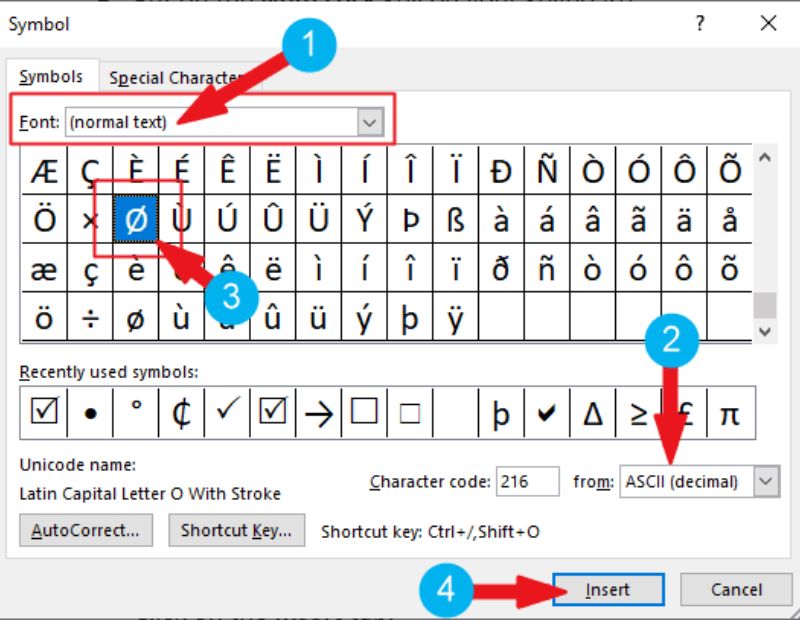
No standard keyboard has a dedicated diameter key. You need a shortcut.
| Device | Method | Result |
|---|---|---|
| Windows | Alt code (see next section) | Ø or ⌀ |
| Windows Word | Type 2300, press Alt + X | ⌀ |
| Mac | Control + Command + Space, search “diameter” | ⌀ |
| Mac (substitute) | Option + Shift + O | Ø |
| Mac (lowercase) | Option + O | ø |
| Linux | Ctrl + Shift + U, type 2300, press Enter | ⌀ |
| iPhone or Android | Copy and paste, or long press the letter O | Ø or ø |
Diameter Symbol Shortcut Key
The quickest shortcut key depends on your software:
- Word: 2300, then Alt + X
- AutoCAD: %%c
- Windows: Alt + 0216 (gives Ø)
- Mac: Option + Shift + O (gives Ø)
Alt Code for Diameter Symbol
Alt codes only work on Windows with a numeric keypad. Make sure Num Lock is on.
How to Use an Alt Code?
- Click where you want the symbol.
- Hold down the Alt key.
- Type the code on the numeric keypad (not the top row numbers).
- Release the Alt key.
Alt Code Table
| Alt Code | Result | Note |
|---|---|---|
| Alt + 0216 | Ø | Most popular diameter substitute |
| Alt + 0248 | ø | Lowercase version |
| Alt + 8960 | ⌀ | True sign, works in some apps only |
| Alt + 237 | φ | Greek small phi |
| Alt + 232 | Φ | Greek capital phi |
An Important Correction
Many websites say Alt + 0216 types the diameter sign. It does not. It types Ø, which is a Latin letter. The true diameter sign is ⌀, at Unicode U+2300. For most people, Ø is close enough. For formal drawings, use ⌀.
Laptop Without a Numpad?
Try these fixes:
- Turn on the embedded number pad using the Fn key.
- Use the Insert Symbol menu instead.
- Use copy and paste.
Diameter Symbol Unicode
Unicode is the global standard that gives every character a unique number. The diameter sign has its own place in it.
| Property | Value |
|---|---|
| Name | Diameter Sign |
| Symbol | ⌀ |
| Unicode | U+2300 |
| Decimal | 8960 |
| HTML entity | ⌀ or ⌀ |
| CSS | \2300 |
| Block | Miscellaneous Technical |
| UTF-8 bytes | E2 8C 80 |
Related Unicode Characters
| Symbol | Name | Unicode | HTML |
|---|---|---|---|
| Ø | Latin capital O with stroke | U+00D8 | Ø |
| ø | Latin small o with stroke | U+00F8 | ø |
| ∅ | Empty set | U+2205 | ∅ |
| Φ | Greek capital phi | U+03A6 | Φ |
| φ | Greek small phi | U+03C6 | φ |
| ⊘ | Circled division slash | U+2298 | ⊘ |
ASCII Diameter Symbol
There is no diameter symbol in standard ASCII. Standard ASCII only covers 128 basic characters (codes 0 to 127), and the diameter sign is not among them.
What you can find is Ø in extended character sets. In Windows-1252 and ISO 8859-1, Ø sits at code 216 and ø at code 248. That is why Alt + 0216 works.
| Character | Standard ASCII | Extended Code |
|---|---|---|
| ⌀ | Not available | Unicode only (U+2300) |
| Ø | Not available | 216 |
| ø | Not available | 248 |
Diameter Symbol in Word
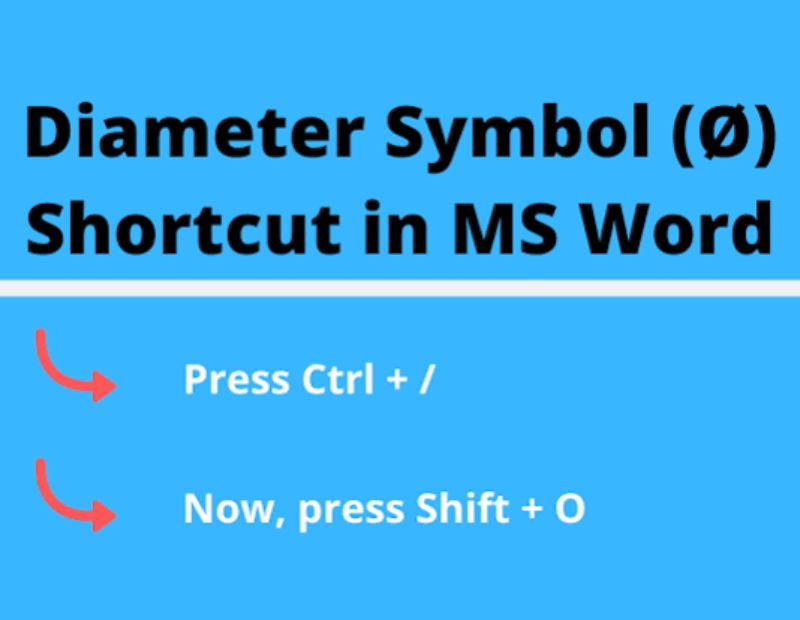
Microsoft Word gives you three easy options.
Method 1: Unicode Plus Alt + X
- Type 2300 where you want the symbol.
- Press Alt + X.
- The numbers turn into ⌀.
Method 2: Insert Symbol
- Go to the Insert tab.
- Click Symbol, then More Symbols.
- Set the subset to Miscellaneous Technical.
- Select ⌀ and click Insert.
Method 3: AutoCorrect
- Open Insert, then Symbol, then AutoCorrect.
- Type a short tag like dia; in the “Replace” box.
- Paste ⌀ in the “With” box.
- Click Add.
From now on, typing your tag swaps in the symbol automatically.
Diameter Symbol in Excel
Excel does not allow you to type the symbol from the keyboard directly, but you have four easy ways.
- Insert tab: Choose Symbol, pick ⌀ from Miscellaneous Technical, and click Insert.
- Alt code: Hold Alt and type 0216 for Ø.
- CHAR function: Type
=CHAR(216)to get Ø. - UNICHAR function: Type
=UNICHAR(8960)to get the true ⌀.
Join the Symbol With a Number
To show a value like ⌀25 in a cell, use:
=UNICHAR(8960)&A1
If cell A1 holds 25, the result is ⌀25. This works well for parts lists and product sheets.
AutoCAD Diameter Symbol
AutoCAD supports the symbol through special control codes, which have worked for years.
Quick Methods
| Method | Steps |
|---|---|
| Control code | Type %%c before the number, such as %%c50 |
| Text Editor ribbon | In MText, open the Symbol flyout and pick Diameter |
| Right click menu | Right click in the text editor, choose Symbol, then Diameter |
| Unicode | Enter \U+2300 in text |
When you finish typing %%c50, AutoCAD displays ⌀50.
Other Useful AutoCAD Codes
- %%d gives the degree symbol (°)
- %%p gives plus or minus (±)
If You See a Box or Question Mark
The font may not support the symbol. Change the text style to a font that includes it, such as a standard SHX font used for drawings.
Diameter Symbol in SolidWorks
SolidWorks adds the symbol for you on most diameter dimensions. When you dimension a circle, the ⌀ appears automatically in front of the value.
Adding It to Notes or Dimension Text
- Double click the note or dimension text to edit it.
- Use the Symbols option in the text panel and choose Diameter.
- Or type the tag
<MOD-DIA>in the dimension text box. - Click OK to apply.
Tips
- Use the Dimension Palette to change how a diameter is displayed.
- For holes, use the Hole Callout tool, which adds the symbol along with depth or thread information.
- Make sure your drawing standard (ISO or ASME) is set so the symbol follows your company rules.
Diameter Symbol in Math
In math and geometry, the diameter is usually written with the letter d or D, not the symbol. The ⌀ appears more in applied fields such as engineering and design.
Here is how each field handles it:
- Geometry: d = 2r
- Physics: D or d for the width of a lens, wire, or sphere
- LaTeX: Use
\diameterwith the right package, or\varnothingfor ∅ (the latter is really an empty set symbol) - Statistics: Not usually used
One caution: ∅ looks like the diameter symbol but means “empty set” in math. Avoid using it on drawings, since it can confuse readers.
15 Types of Diameter Symbol
Here are 16 symbols and notations people use for diameter, including the true sign and common substitutes.
| No. | Symbol or Term | Name | Where It Is Used |
|---|---|---|---|
| 1 | ⌀ | Diameter sign (U+2300) | Standard technical drawings |
| 2 | Ø | Latin capital O with stroke | Common substitute |
| 3 | ø | Latin small o with stroke | Lowercase, Nordic languages |
| 4 | ∅ | Empty set | Math, sometimes misused |
| 5 | Φ | Greek capital phi | Used in some regions for diameter |
| 6 | φ | Greek small phi | Physics and math |
| 7 | ϕ | Phi symbol variant | Math notation |
| 8 | ⊘ | Circled division slash | Rare substitute |
| 9 | %%c | AutoCAD control code | CAD drawings |
| 10 | DIA | Text abbreviation | Labels and notes |
| 11 | dia. | Lowercase abbreviation | Everyday writing |
| 12 | d or D | Letter variable | Geometry |
| 13 | OD | Outer diameter | Pipes, tubes, rings |
| 14 | ID | Inner diameter | Pipes, bearings, bores |
| 15 | DN | Nominal diameter | Pipe sizing |
| 16 | S⌀ | Spherical diameter | Drawings of spheres |
Radius and Diameter Symbol
The radius and diameter symbol work as a pair, and they are easy to mix up.
| Term | Symbol | Meaning | Formula |
|---|---|---|---|
| Diameter | ⌀ | Full width through center | d = 2r |
| Radius | R | Center to edge | r = d ÷ 2 |
| Spherical radius | SR | Radius of a sphere | Same as r |
| Spherical diameter | S⌀ | Diameter of a sphere | Same as d |
Easy Rule
Diameter is double the radius. If a drawing says R10, the matching diameter is ⌀20.
Outer Diameter Symbol
The outer diameter symbol uses the standard ⌀ with a label. The outer diameter, often shortened to OD, is the full width across the outside edge of a pipe, tube, ring, or shaft.
Example: ⌀50 OD
Where it is used:
- Pipes and tubing
- Shafts and axles
- Washers and rings
- Cylinders and bottles
Inner Diameter Symbol
The inner diameter symbol follows the same pattern. The inner diameter, or ID, is the width of the hollow space inside.
Example: ⌀40 ID
Where it is used:
- Bearings and bushings
- Hoses and pipes
- Nuts and washers
- Bores and sleeves
Wall Thickness Quick Formula
Wall thickness = (OD minus ID) ÷ 2
So a pipe with ⌀50 OD and ⌀40 ID has a wall thickness of 5.
Diameter Outside Symbol
People searching “diameter outside symbol” usually mean the OD marking or a symbol placed outside a bracket or tolerance box. On drawings, the ⌀ always sits before the number and outside any tolerance values.
Correct: ⌀25 ±0.1
Wrong: 25⌀ ±0.1
Diameter Hole Symbol
The diameter hole symbol is how drawings describe drilled or bored holes. The ⌀ gives the hole size, and extra symbols add more detail.
| Symbol | Name | Unicode | Meaning |
|---|---|---|---|
| ⌀ | Diameter | U+2300 | Hole width |
| ⌴ | Counterbore | U+2334 | Flat bottom recess |
| ⌵ | Countersink | U+2335 | Cone shaped recess |
| ↧ | Depth | U+21A7 | How deep the hole goes |
Example note: ⌀8 THRU
This tells the machinist to drill an 8 unit hole all the way through the part.
Diameter Phi Symbol
Some people use the Greek letter phi (Φ or φ) in place of the diameter sign. This is common in parts of Asia and in older documents. Phi looks like a circle with a vertical line, while the diameter sign has a slanted line.
| Feature | ⌀ Diameter | Φ Phi |
|---|---|---|
| Line angle | Slanted | Vertical |
| Official standard symbol | Yes | No |
| Unicode | U+2300 | U+03A6 |
| Typical use | Drawings, specs | Local habit, math |
If you are creating drawings for an international team, use ⌀ so nobody misreads it.
Why Using the Right Symbol Matters?
Choosing between ⌀, Ø, and ∅ may seem small, but it has real effects.
- Clarity: A wrong symbol can confuse a machinist or buyer.
- Standards: Quality audits may check drawing symbols.
- Search and data: Product feeds and databases can break on unsupported characters.
- Printing: Some fonts turn ⌀ into a box when exported.
Tips for Using the Diameter Symbol Correctly
- Place ⌀ directly before the number with no space, or a thin space.
- Use ⌀ for circles and S⌀ for spheres.
- Pick one style across the whole document.
- Test your font before sharing the file.
- Save your files as PDF to keep the symbol intact.
- Use Unicode text for websites so the symbol displays on all devices.
Frequently Asked Questions About the Diameter Symbol
What is the diameter symbol?
It is ⌀, a circle with a diagonal line through it. It marks the width of a circle through its center.
What is the Alt code for the diameter symbol?
Alt + 0216 types Ø, the closest common substitute. For the true ⌀, use Alt + 8960 in supported apps or type 2300 then Alt + X in Word.
What is the Unicode for the diameter symbol?
The Unicode is U+2300. The HTML code is ⌀.
How do I type the diameter symbol on a Mac?
Open the Character Viewer with Control + Command + Space and search “diameter.” For Ø, press Option + Shift + O.
How do I type the diameter symbol in Word?
Type 2300 and press Alt + X. You can also use Insert, then Symbol, then Miscellaneous Technical.
How do I insert the diameter symbol in Excel?
Use the Insert Symbol menu, or type =UNICHAR(8960) in a cell.
What is the AutoCAD code for diameter?
Type %%c before the number. For example, %%c50 shows ⌀50.
How do I get the diameter symbol in SolidWorks?
It appears automatically on circle dimensions. You can also add it from the Symbols menu or with the tag <MOD-DIA>.
Is there an ASCII code for the diameter symbol?
No. Standard ASCII has none. Ø exists in extended sets at code 216.
What is the difference between ⌀ and Ø?
⌀ is the official diameter sign, while Ø is a Latin letter often used as a substitute.
What is the difference between ⌀ and ∅?
⌀ means diameter. ∅ means empty set in math.
What is the difference between radius and diameter?
Radius is the distance from the center to the edge. Diameter is twice the radius.
What does OD and ID mean?
OD is outer diameter and ID is inner diameter. Both describe the width of pipes, rings, and tubes.
Can I use phi instead of the diameter symbol?
Some regions do, but the official symbol is ⌀. Use phi only if your team or standard requires it.
Why does the diameter symbol show as a box?
The font does not support it. Switch to Segoe UI Symbol, Arial Unicode MS, or Cambria Math.
Conclusion
The diameter symbol (⌀) is a small character with a big job. It tells everyone, in one glance, that a number measures the full width of a circle through its center.
Now you know how to type it everywhere. Copy it from this page for a quick fix, use 2300 plus Alt + X in Word, try UNICHAR(8960) in Excel, or type %%c in AutoCAD. Remember that Alt + 0216 gives Ø, which is a close substitute but not the official sign. Keep the symbol tables in this guide close, and you will never need to search for it again.
