

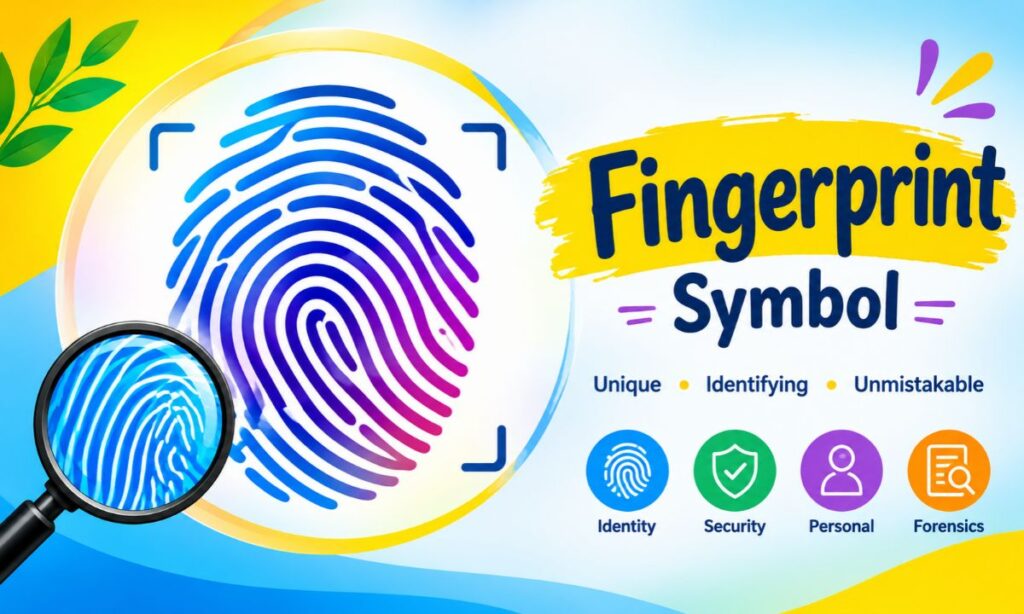
Fingerprint symbol is the newest way to say “identity,” “security,” or “one of a kind” in a single tap. Until recently, people had to borrow a lock or a hand emoji for that idea. Now there is an official fingerprint emoji, plus a long list of icons, text symbols, and PNG files that do the same job.
This guide covers the fingerprint symbol meanings, a copy and paste list, how to download it, how it appears on Android and iPhone, and how it links to security, forensics, autism awareness, and love. Everything is written in plain language so you can find your answer fast.
Here is the quick version. The fingerprint symbol (Unicode U+1FAC6) was approved in Emoji 16.0 and released in September 2024. It stands for identity, privacy, biometrics, and uniqueness.
What Is the Fingerprint Symbol?
The fingerprint symbol is a picture of the ridge pattern on a human fingertip. Those curved lines are called friction ridges. The symbol shows them as swirling or looping lines inside a rounded shape.
You will meet it in three forms:
- The emoji: , the official Unicode character you can type in a message.
- The UI icon: the biometric icon on phones, apps, and door locks.
- The graphic: PNG, SVG, or vector artwork used in logos, posters, and websites.
Each version carries the same core idea. You are one person, and your mark cannot be swapped with anyone else’s.
Read Also This Blog: Magnet Symbol
Fingerprint Symbol Meanings: 15+ Powerful Interpretations
The symbol is simple, but its meaning shifts with context. Below are the most common readings.
- Identity: Your fingerprint says who you are, which is why it appears on ID systems and passports with biometric data.
- Uniqueness: No two people share the same pattern. Identical twins differ too.
- Security: A fingerprint on a screen usually means “protected” or “verified.”
- Privacy: Using it in a post can hint that something is personal or confidential.
- Authentication: It signals a login, a payment approval, or a lock that only you can open.
- Biometrics: Tech brands use it as a shortcut for biometric data.
- Forensics and crime: In detective stories, a fingerprint means evidence, a clue, or a trace left behind.
- Legacy: A mark you leave on the world, such as “leave your fingerprint on history.”
- Individuality: It is a favorite for self-expression, branding, and “be yourself” slogans.
- Human connection: A fingerprint is physical touch turned into a symbol.
- Trust: Banks and fintech apps use it to show a safe, personal login.
- Ownership: A fingerprint can mean “this is mine” or “I made this.”
- Presence: It suggests someone was here and touched something.
- Love and bonding: Couples use matching fingerprints to show a bond that is one of a kind.
- Awareness and diversity: Campaigns use it to say every person is different and valuable.
- Mystery: In thrillers and games it can suggest something hidden waiting to be found.
Fingerprint Symbol Meaning in Texting and Social Media
In chats and captions, the emoji is still new, so people are experimenting with it. Common uses so far:
- Adding it to a post about privacy, data, or online safety.
- Pairing it with a lock for “secured.”
- Using it as a playful “my mark is on this” tag.
- Placing it beside a caption about being original.
Because the character is recent, some people will see a blank box if their device is out of date. When your audience may have older software, add a short word next to it so the message still lands.
Fingerprint Symbol Text and Copy and Paste
Most people searching this topic want one thing: the symbol, ready to use. Tap or select the character below, copy it, and paste it anywhere.
Fingerprint Symbol Copy and Paste
Main fingerprint emoji:
Related symbols that tell a similar story:
| Symbol | Name | Best Use |
|---|---|---|
| | Fingerprint | Identity, security, uniqueness |
| 🔒 | Locked | Secure access, privacy |
| 🔐 | Locked with key | Protected login |
| 🔏 | Locked with pen | Signed or verified |
| 🛡️ | Shield | Protection, safety |
| 👆 | Finger pointing up | Touch, tap here |
| ☝️ | Index pointing up | Attention, “one” |
| 🫵 | Index pointing at viewer | “You,” direct address |
| 🧬 | DNA | Biology, genetics |
| 🔍 | Magnifying glass | Investigation, search |
| 🕵️ | Detective | Mystery, forensics |
| ❤️ | Red heart | Love, affection |
Fingerprint Symbol Text Art and Look Alike Characters
There is only one true fingerprint character, but swirl style characters can imitate the look in a bio, username, or text design:
| Character | Look | Note |
|---|---|---|
| ꩜ | Spiral | Closest to a ridge swirl |
| ◎ | Concentric rings | Works for a whorl style |
| ◉ | Fisheye | Bold, simple pattern |
| ⌾ | Circled ring | Minimal, clean |
| 𖦹 | Spiral dot | Decorative |
These are text symbols, not emoji, so they render in most fonts but may look different from app to app.
How to Type the Fingerprint Symbol Without Copying?
You can also insert it directly:
- Windows: Press the Windows key plus the period key, then search “fingerprint.”
- Mac: Press Control, Command, and Space, then search “fingerprint.”
- iPhone or Android: Open your emoji keyboard and type “fingerprint” in the search bar.
- HTML: Use the code
🫆 - Python: Use
\U0001FAC6 - JavaScript: Use
\u{1FAC6}
If you see a blank square or question mark, your system has not received the Emoji 16.0 update yet.
Fingerprint Symbol on Android and iPhone
Appearance and availability depend on your device, because each company draws its own version of every emoji.
Fingerprint Symbol Android
On Android, the emoji follows Google’s Noto Color Emoji style. Support depends on your Android version and the latest system or keyboard update. If it does not show, update your system and your Gboard keyboard, then check again.
Separately, Android also has a well known fingerprint icon used in the security menu. That icon belongs to the system interface, not the emoji set. You will see it when you set up unlock, approve a payment, or confirm a login. Google also offers a free fingerprint icon in its Material Symbols library, which designers often use in apps.
Fingerprint Symbol iPhone
On iPhone, the emoji appears in Apple’s glossy emoji style once your software includes Emoji 16.0 support. Updating to a recent iOS version is the simplest fix when you cannot find it. Open the emoji keyboard, search “fingerprint,” and tap to insert.
iPhone fans may also recognize the old Touch ID icon, which Apple introduced with the iPhone 5s in 2013. That icon is part of Apple’s interface and is different from the emoji character.
Platform Comparison
| Platform | How It Appears | What To Do If Missing |
|---|---|---|
| iPhone and iPad | Apple Color Emoji style | Update iOS |
| Android | Google Noto style | Update Android and Gboard |
| Windows | Fluent style | Install latest Windows updates |
| Mac | Apple style | Update macOS |
| Social apps | Varies | Update the app |
How to Download the Fingerprint Symbol?
You can get the fingerprint symbol as an image, an icon, or a favicon. Follow these steps.
Method 1: Save as a PNG
- Search for “fingerprint symbol PNG” on an emoji or icon site.
- Choose the style you like, such as Apple, Google, or a flat design.
- Click download and pick your size, for example 128, 256, or 512 pixels.
- Save the file to your device.
Method 2: Use an Icon Library
- Open a trusted icon library like Material Symbols, Flaticon, or Icons8.
- Search “fingerprint.”
- Pick SVG for sharp scaling or PNG for quick use.
- Read the license before using it in a product or ad.
Method 3: Turn the Emoji into a Favicon
Some free tools convert an emoji into a favicon with multiple sizes. This is handy if you run a website about security, privacy, or forensics and want a quick brand mark.
Method 4: Take a Screenshot
For personal use, you can paste the emoji in a notes app, enlarge it, and take a screenshot. This works, but resolution will be limited.
Tip: Choose PNG with a transparent background if you plan to place the symbol over colors or photos. Choose SVG if you need to resize it without losing quality.
Fingerprint Symbol PNG: Size and Format Guide
| Format | Best For | Quality When Resized |
|---|---|---|
| PNG | Social posts, slides, thumbnails | Good at set sizes |
| SVG | Logos, websites, print | Perfect at any size |
| ICO | Favicons | Fixed sizes |
| JPG | Not ideal, no transparency | Average |
Fingerprint Scanner Symbol and Fingerprint Sensor Symbol
People often use these two phrases for the same thing, but there is a small difference.
- Fingerprint scanner symbol: The icon that shows a device can read a fingerprint, usually printed on a scanner pad, door lock, or time clock.
- Fingerprint sensor symbol: The icon that marks where the sensor sits on a phone, such as the power button, back panel, or under the screen.
Both normally show a rounded print with curved lines, sometimes inside a square or circle. A few designs add a small frame, brackets, or a scan line to show that reading is taking place.
Fingerprint Animation Symbol
Many apps show an animated fingerprint while they wait for you. Common effects include:
- Pulsing glow around the print.
- A line sweeping from top to bottom to imitate scanning.
- Ridges that fill in with color when the scan succeeds.
- A green check or red cross to show pass or fail.
Designers use these animations because they give clear feedback in under a second, which feels reassuring to users.
Fingerprint Lock Symbol
The fingerprint lock symbol merges a padlock and a fingerprint. It tells you something is protected and that your finger is the key. You will see it on:
- Smart door locks and safes.
- Banking and wallet apps.
- Password managers.
- Gallery or notes apps with a private folder.
Its meaning is almost always “secure access with biometrics.”
Anti Fingerprint Symbol
The anti fingerprint symbol is the opposite idea. It usually shows a fingerprint with a slash through it or a crossed circle. Manufacturers print it on product pages and packaging to promote surfaces that resist smudges.
You will find it on:
- Stainless steel appliances.
- Phone screen protectors with an oleophobic coating.
- Laptop lids and camera lenses.
- Glass and glossy panels.
In this case, the symbol is not about security. It is about keeping surfaces clean.
Fingerprint Pattern Symbol: Loops, Whorls, and Arches
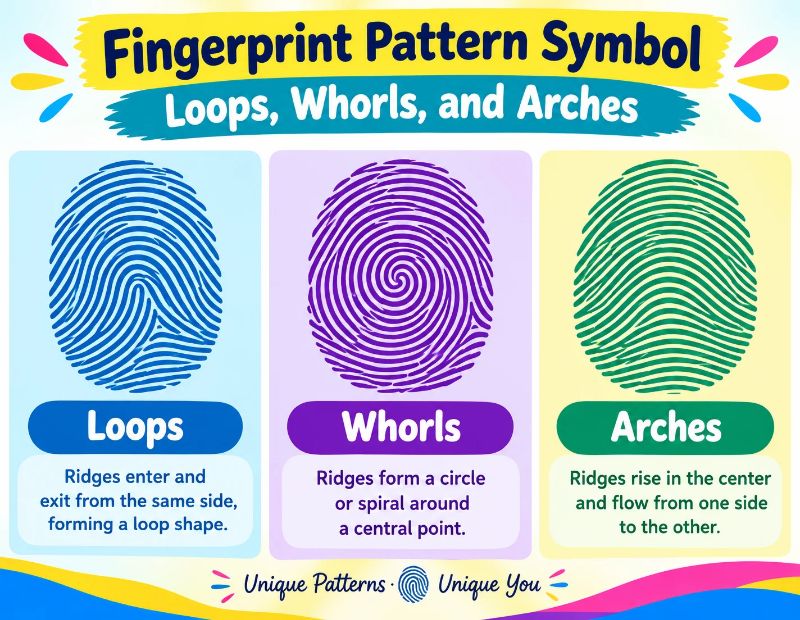
Every fingerprint falls into one of three main pattern families. Forensic experts have used this system for over a century, and it started with work by Francis Galton and later Edward Henry.
| Pattern | Look | Approximate Frequency |
|---|---|---|
| Loop | Ridges enter, curve, and exit on the same side | Most common, about 60 to 65 percent |
| Whorl | Circular or spiral ridges | About 30 to 35 percent |
| Arch | Ridges rise like a hill | About 5 percent |
Percentages vary slightly between sources and populations, but loops are always the largest group.
Loop Fingerprint Symbol
A loop fingerprint symbol shows ridges that curve back toward the direction they came from, like a hairpin. When designers want a realistic, everyday print, they usually choose a loop because it is the most common.
Ulnar Fingerprint Symbol
The ulnar loop is a type of loop that opens toward the ulna, the bone on the little finger side of your forearm. In diagrams, an ulnar fingerprint symbol shows loop lines leaning toward the pinky. Its counterpart, the radial loop, opens toward the thumb side and is much rarer. Students of forensics and anatomy see this symbol often in study charts.
Whorl and Arch Symbols
A whorl symbol looks like concentric circles or a spiral, which makes it a popular choice for logos. An arch symbol shows gentle waves with no loops or circles, giving a calm and simple look.
Fingerprint Symbol for Autism
Many people search this phrase, so it deserves a careful answer.
The fingerprint is not an official symbol of autism. The most recognized symbols are the infinity sign, representing diversity and the spectrum, and the puzzle piece, which has also drawn criticism from parts of the autistic community.
That said, some families, schools, and awareness groups use a fingerprint image to say that every autistic person is unique. Their message is simple: no two individuals are alike, and support should be personal. If you use it, treat it as a creative choice rather than an official emblem, and check what the community you are speaking to prefers.
Fingerprint Love Symbol
Few images express “one of a kind” as well as a fingerprint, so it shows up in romance too.
- Heart shaped fingerprint: Two thumbprints pressed together to form a heart.
- Couples tattoos: Partners ink each other’s prints on their skin.
- Jewelry: Rings and pendants engraved with a loved one’s print.
- Memorial keepsakes: A print kept as a lasting memory of someone special.
- Wedding guestbooks: Guests add thumbprints to form a tree or heart.
For messages, pair the emoji with ❤️ to say “you are my only one” in a quiet way.
Fingerprint Symbol Facts You Should Know
Here are facts that make this symbol more interesting.
- Fingerprints begin forming before birth, usually during the second trimester.
- They stay the same throughout life, apart from damage like deep cuts.
- Identical twins have different prints because ridge formation is influenced by tiny conditions in the womb.
- Koalas have prints so similar to humans that they have confused researchers.
- Fingerprints help your fingers grip objects and improve touch sensitivity.
- The study of fingerprints is called dermatoglyphics.
- Police have used fingerprints for identification for well over 100 years.
- Phone makers popularized fingerprint unlock for ordinary users in the early 2010s.
Where the Fingerprint Symbol Is Used Today
| Field | How It Is Used |
|---|---|
| Technology | Phone unlock, laptop login, app approval |
| Banking | Mobile payments and secure sign in |
| Law enforcement | Evidence cards, identification databases |
| Travel | Biometric passports and border checks |
| Workplace | Attendance and access systems |
| Design and branding | Logos for security, ID, and identity themed brands |
| Social media | Captions about privacy and originality |
| Art and gifts | Prints, tattoos, and keepsakes |
Tips for Using the Fingerprint Symbol Well
Small choices make the symbol more effective.
- Keep the message clear. Pair the emoji with a short phrase so the meaning is obvious.
- Do not overuse it. One strong fingerprint beats five in a row.
- Test on multiple devices when you publish, since older phones may show a blank box.
- Use SVG in logos to keep lines sharp.
- Choose contrast. Thin ridge lines vanish on busy backgrounds.
- Respect licenses when you download icons or artwork.
- Avoid using a real person’s fingerprint image in public, since it is sensitive biometric data.
Conclusion
The fingerprint symbol packs a lot into one tiny picture: identity, privacy, security, and the idea that you are unlike anyone else. Whether you want to copy and paste the emoji, download a PNG, or understand loops, whorls, and arches, you now have what you need.
If the emoji does not appear on your phone or computer, update your system and keyboard. Then use the symbol with a clear message, and it will do its job.
Frequently Asked Questions
What does the fingerprint symbol mean?
It stands for identity, uniqueness, privacy, and biometric security. In some contexts it also means evidence, legacy, or personal connection.
What is the fingerprint symbol text or code?
The Unicode code is U+1FAC6, and the HTML entity is 🫆. You can also copy the character directly.
How do I copy and paste the fingerprint symbol?
Select the character, copy it with Ctrl+C or Cmd+C, and paste it with Ctrl+V or Cmd+V. On phones, long press and choose copy.
How do I download the fingerprint symbol?
Search for a fingerprint symbol PNG or SVG on a trusted emoji or icon site, choose a size, and click download. Check the license before commercial use.
Is the fingerprint symbol available on Android?
Yes, on Android versions and keyboards that support Emoji 16.0. Update your system and Gboard if it does not show.
Is the fingerprint symbol available on iPhone?
Yes, on iOS versions that include Emoji 16.0. Update your iPhone and search “fingerprint” in the emoji keyboard.
Can I get a fingerprint symbol PNG with a transparent background?
Yes, many icon libraries offer transparent PNG files. Pick the transparent option before downloading.
Is the fingerprint an official symbol for autism?
No. The infinity sign is the most common autism awareness symbol, but some groups use the fingerprint to show that every person is unique.
What is an ulnar loop fingerprint symbol?
It is a loop pattern whose ridges open toward the ulna, the little finger side of the hand. It is the most common type of loop.
What is a loop fingerprint symbol?
It shows ridges that enter, curve, and exit on the same side of the finger. Loops make up the majority of human fingerprints.
What does the anti fingerprint symbol mean?
It marks a smudge resistant surface, usually shown as a fingerprint with a slash. You will see it on screens, glass, and metal products.
What is the difference between a fingerprint scanner symbol and a sensor symbol?
The scanner symbol marks a device that reads fingerprints, while the sensor symbol shows the exact spot on a phone where you place your finger. People often use them interchangeably.
What is a fingerprint animation symbol?
It is an animated icon, such as a pulsing or scanning print, that shows an app is reading your finger. It ends with a check or cross to show the result.
What does the fingerprint lock symbol mean?
It combines a lock and a fingerprint to show that access needs your biometric data. Apps and smart locks use it often.
What is a fingerprint pattern symbol?
It is a picture of one of the three main print types: loop, whorl, or arch. Each has a distinct ridge shape.
What is the fingerprint love symbol?
It is a fingerprint used to show a one of a kind bond, often as a heart made from two thumbprints or a matching tattoo.
