


Here is the quick answer. The parallelogram symbol looks like this: ▱ (white) or ▰ (black). You can copy either one and paste it anywhere. The same slanted shape also appears as the input and output box in flowcharts and as the flatness mark in engineering drawings.
That is why the parallelogram symbol confuses people. One shape does several different jobs depending on the field. This guide explains each meaning, shows you how to type or copy the symbol, and covers geometry, Word, LaTeX, PNG files, emoji and more.
What Is a Parallelogram Symbol?
A parallelogram symbol is any character or drawing that shows a four sided shape with two pairs of parallel sides. The shape leans to one side instead of standing straight like a rectangle.
In text, there are two main Unicode characters:
| Symbol | Name | Unicode | HTML code |
|---|---|---|---|
| ▱ | White Parallelogram | U+25B1 | ▱ |
| ▰ | Black Parallelogram | U+25B0 | ▰ |
| ⏥ | Flatness | U+23E5 | ⏥ |
The white parallelogram was added to Unicode in 1993, in the Geometric Shapes block. The flatness character came later, in Unicode 5.0 in 2006, and sits in the Miscellaneous Technical block.
Outside of text, the parallelogram symbol is a drawn shape. You see it in flowcharts, diagrams, logos, math worksheets and technical drawings.
Read Also This Blog: ATM Symbol
Characteristics Of Parallelogram Symbol
Whatever form it takes, the symbol shares a few clear traits:
- Four sides. It is a quadrilateral.
- Two pairs of parallel sides. Opposite sides run in the same direction.
- A slanted look. The leaning edges make it easy to spot at a glance.
- Neutral in text. Unicode treats it as an “other symbol” and it is not mirrored in right to left text.
- Math friendly. Unicode lists U+25B1 with the math property, so it suits mathematical writing.
- Not an emoji. It displays as plain text, not as a colourful picture.
- Font dependent. Some fonts draw it neatly. Others replace it with a box.
Purpose Of Parallelogram Symbol
The shape serves different goals in different places:
- Geometry. It labels a parallelogram in a diagram or proof.
- Programming and process maps. It marks where data goes in or comes out.
- Engineering. It tells a machinist that a surface must be flat within a set tolerance.
- Typography and design. It adds a geometric accent to titles, bullets and progress bars.
- Education. It helps students recognise shapes quickly.
In every case, the symbol saves words. A single slanted box replaces a whole sentence.
Effects Of Parallelogram Symbol
Using the right symbol has real effects:
- Faster reading. People recognise standard shapes without effort.
- Fewer errors. A correct flatness symbol stops a part from being made wrongly.
- Shared language. Programmers, engineers and teachers can follow the same diagram.
- Cleaner design. A few symbols look tidier than long text.
Using the wrong symbol has the opposite effect. For example, putting a process step inside a parallelogram in a flowchart can confuse a reader who expects data input or output.
Parallelogram Symbol Copy And Paste
Copy any of these and paste them where you need them:
| Symbol | Best use |
|---|---|
| ▱ | Geometry notation, GD&T flatness, outlines |
| ▰ | Filled shapes, progress bars, bullets |
| ⏥ | Flatness in technical documents |
| ∥ | Parallel lines (not a parallelogram, but often confused with it) |
Tip: if the symbol shows up as an empty box, the font does not support it. Switch to a font such as Segoe UI Symbol, Arial Unicode MS or Noto Sans Symbols 2, which include geometric shapes.
Parallelogram Symbol Text
If you want to build the symbol in code or a web page, use these methods:
- HTML decimal:
▱gives ▱ - HTML hex:
▱gives ▱ - CSS content:
content: "\25B1"; - JavaScript:
"\u25B1" - Python:
"\u25b1" - UTF-8 bytes: E2 96 B1
For the black version, replace 25B1 with 25B0.
You can also use the symbols for text art. A popular trick is a progress bar made from ▰▰▰▱▱, where black shapes show completed steps and white shapes show the rest.
Parallelogram Symbol PNG
Sometimes you need a picture instead of a character. A PNG file works well for presentations, worksheets, posters and websites.
Here is a simple way to make one:
- Open PowerPoint, Word or Google Slides.
- Insert a parallelogram shape from the basic shapes menu.
- Choose your fill colour and outline.
- Right click the shape and select “Save as Picture”.
- Pick PNG and enable a transparent background if the option appears.
Tips for good results:
- Use a high resolution for sharp edges.
- Choose a transparent background so it sits cleanly on any page.
- Save a vector copy such as SVG if you want to resize it without losing quality.
- Name the file clearly, for example “parallelogram symbol blue”, and add alt text on your website.
Parallelogram Symbol In Flowchart
This is the most searched use. In a flowchart, the parallelogram means input or output. It shows the point where data enters the process or leaves it.
Examples of input:
- A user types a name.
- A program reads a number from a file.
- A customer submits an order.
Examples of output:
- The screen shows a result.
- The system prints a receipt.
- An order confirmation number is generated.
The standard flowchart symbols work together like this:
| Shape | Meaning |
|---|---|
| Oval | Start or end |
| Rectangle | Process or action |
| Diamond | Decision (yes or no) |
| Parallelogram | Input or output |
| Arrow | Flow direction |
Flowchart symbols were standardised in the 1960s by ANSI. ISO later adopted them, and the current standard, ISO 5807, dates from 1985 with a refresh in 2019.
Parallelogram Input And Output Symbol
A common mistake is putting every instruction in a rectangle. If the step asks the user for something or shows something to the user, use a parallelogram instead.
Good examples:
- INPUT age
- OUTPUT total
- READ marks
- PRINT result
Bad example: “total = price × quantity”. This is a calculation, so it belongs in a rectangle.
Many people label the box with “Input” or “Output” to make the direction clear. This is a good habit because the same shape serves both purposes.
Parallelogram Symbol In Word
You can add the symbol to a Word document in three ways.
Method 1: Insert Symbol
- Click Insert, then Symbol, then More Symbols.
- Choose a font like Segoe UI Symbol.
- Set the subset to Geometric Shapes.
- Select ▱ and click Insert.
Method 2: Unicode shortcut
- Type 25B1 in your document.
- Press Alt and X together.
- Word turns the code into ▱.
Method 3: Draw the shape
- Click Insert, then Shapes.
- Choose the parallelogram under Basic Shapes.
- Drag on the page to draw it.
- Resize, fill and outline as needed.
On a Mac, open the Character Viewer with Control, Command and Space, then search for “parallelogram”.
Parallelogram Symbol In Maths
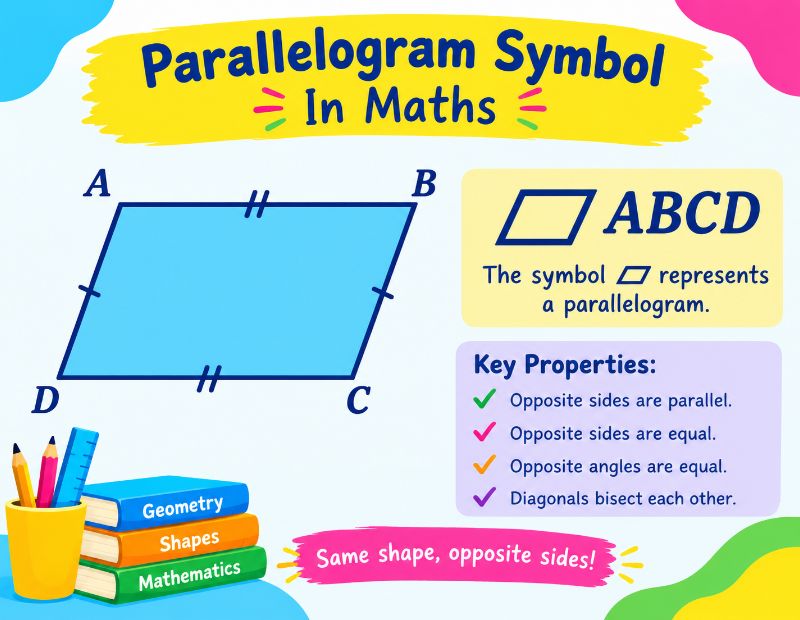
In mathematics classes, the shape is usually drawn, not typed. But the character ▱ appears in notation. Some textbooks and exam papers write ▱ABCD to mean “parallelogram ABCD”, much like △ABC means triangle ABC.
Do not mix it up with similar signs:
| Symbol | Meaning |
|---|---|
| ▱ | Parallelogram |
| ∥ | Parallel to |
| ⟂ | Perpendicular to |
| △ | Triangle |
| □ | Square |
The symbol ∥ describes a relationship between lines. For example, AB ∥ DC. The symbol ▱ describes a whole shape.
Parallelogram Symbol In Geometry
A parallelogram is a simple four sided shape with two pairs of parallel sides. The word comes from Greek and means “of parallel lines”.
Key Properties
- Opposite sides are parallel.
- Opposite sides are equal in length.
- Opposite angles are equal.
- Angles next to each other add up to 180 degrees.
- The diagonals bisect each other, meaning they cut each other in half.
- Each diagonal splits the shape into two congruent triangles.
Important Formulas
| Measure | Formula |
|---|---|
| Area | Base × Height |
| Area (using sides and angle) | a × b × sin(θ) |
| Perimeter | 2 × (a + b) |
Remember that the height is the straight up distance between the base and its opposite side. It is not the slanted side.
Related Shapes
- A rectangle is a parallelogram with four right angles.
- A rhombus is a parallelogram with four equal sides.
- A square is both a rectangle and a rhombus.
- A trapezoid (called a trapezium in British English) has only one pair of parallel sides, so it is not a parallelogram.
The three dimensional version of a parallelogram is called a parallelepiped.
Latex Parallelogram Symbol
LaTeX users often search for a command like \parallelogram, but standard LaTeX does not include a built in one. Here are practical options:
- Use Unicode with XeLaTeX or LuaLaTeX. Paste ▱ directly into your document and choose a font that supports it.
- Use MathJax. Write
\unicode{x25B1}to display ▱, though it depends on the reader’s local fonts. - Draw it with TikZ. Create the shape with coordinates when you need exact control.
- Use a specialised package. Some geometry and font packages offer a glyph. Check the package documentation before relying on one.
- Write the word. In formal proofs, simply write “parallelogram ABCD”.
A small TikZ example shows how a shape can be drawn from four points. Define points A, B, C and D, then connect them in order and close the path. This gives a parallelogram that you can label and colour.
Parallelogram Symbol Emoji
There is no official parallelogram emoji. Unicode marks ▱ and ▰ as ordinary symbols, not emoji, so they will not appear as colourful icons.
Alternatives that look similar:
- Use ▰ and ▱ as text based shapes.
- Use ◆ or ◇ for diamond shapes.
- Use 🟦 or 🟧 for coloured squares.
- Use an image or sticker if you need an emoji style parallelogram.
On social media, people often use ▰▰▰▱▱ to create loading bars and rating meters. It is a neat trick that works almost everywhere.
Parallelogram Symbol In Engineering Drawing
In engineering drawings, a parallelogram usually has one job: it means flatness. Flatness is a form tolerance. It controls how far a surface can wobble or warp from being perfectly flat.
The tolerance zone is made of two parallel planes. The entire surface must stay between them. The gap between the planes is the number written in the drawing.
Why it matters:
- Flat surfaces seal properly, for example on engine heads and gaskets.
- Parts that mate together need smooth contact.
- Machine tables and measuring plates must be accurate.
Flatness is different from related controls:
| Control | What it checks |
|---|---|
| Flatness (▱) | The form of one surface |
| Straightness (⏤) | A single line on a surface |
| Parallelism (∥) | How one surface sits relative to another |
| Perpendicularity (⟂) | A right angle relationship |
Parallelogram Symbol GD&T
GD&T stands for Geometric Dimensioning and Tolerancing. It is a language of symbols used on drawings to describe how precise a part must be.
The flatness symbol sits inside a feature control frame. This is a small rectangular box that contains:
- The geometric symbol (the parallelogram for flatness).
- The tolerance value.
- Datum references, when needed. Flatness does not need any, because it does not relate to another feature.
Key facts about flatness in GD&T:
- It is a form control.
- It applies to a surface, not a size.
- It needs no datum.
- The tolerance must be smaller than any size tolerance that applies to the same surface.
In Unicode, the flatness character is ⏥ at U+23E5. Many CAD fonts map it to the parallelogram shape. If your software does not show it, try ▱ as a substitute in documents, or use your CAD tool’s GD&T palette for formal drawings.
Parallelogram Symbol KA
The phrase “parallelogram symbol ka” looks like a mix of English and Hindi or Urdu. “Ka” means “of”, so the search probably means “the symbol of a parallelogram”. In Hindi, the shape is called samantar chaturbhuj (समांतर चतुर्भुज).
If you are a student searching for this:
- In maths, write the symbol ▱ or the word “parallelogram” before the letters, as in ▱ABCD.
- In a flowchart, use the slanted box for input or output.
- In engineering, use the flatness symbol.
The meaning is the same in every language. Only the name changes.
15+ Powerful Meanings And Uses Of The Parallelogram Symbol
| # | Field | Meaning or use |
|---|---|---|
| 1 | Flowchart | Input or output of data |
| 2 | Geometry | A four sided shape with two pairs of parallel sides |
| 3 | Geometry notation | ▱ABCD means parallelogram ABCD |
| 4 | GD&T | Flatness |
| 5 | Engineering drawing | Surface form tolerance |
| 6 | Quality control | Surface inspection requirement |
| 7 | Programming | Reading or printing values in algorithms |
| 8 | Software design | Data nodes in process diagrams |
| 9 | Business process mapping | Documents or information entering or leaving a process |
| 10 | Education | Teaching shape recognition |
| 11 | Typography | Decorative bullets and separators |
| 12 | Text art | Progress bars with ▰ and ▱ |
| 13 | Web design | Slanted banners and buttons |
| 14 | Logo design | Movement, speed and dynamism |
| 15 | Mathematics | Area and vector addition models |
| 16 | Physics | The parallelogram law of vector addition |
| 17 | Architecture | Slanted facades and floor plans |
The physics use deserves a note. In the parallelogram law, two vectors drawn from the same point form two sides of a parallelogram. The diagonal from that point shows their sum. This helps students add forces and velocities.
Common Mistakes To Avoid
- Confusing ▱ with ∥. One is a shape, the other means “parallel to”.
- Using a parallelogram for processes. Use a rectangle instead.
- Assuming all fonts support it. Test before you send or publish.
- Mixing up flatness and parallelism. Flatness checks one surface. Parallelism compares two.
- Calling a trapezoid a parallelogram. A trapezoid needs only one parallel pair.
- Ignoring labels. Always say “input” or “output” inside a flowchart parallelogram.
Quick Tips For Using The Symbol Well
- Keep symbols consistent across a document.
- Add a short key or legend for readers who are new to the shape.
- Test your file on phone, tablet and desktop.
- Use images or SVG for professional drawings.
- For formal engineering work, follow the standard your company or country uses.
Conclusion
The parallelogram symbol is simple to see but rich in meaning. In text, it is ▱ or ▰. In flowcharts, it marks input and output. In engineering, it stands for flatness. In geometry, it names a shape with parallel opposite sides.
Now you know how to copy it, code it, type it in Word, draw it for LaTeX and save it as a PNG. Choose the version that fits your task, check that your font supports it, and use it in its correct context. That is how you make the parallelogram symbol work for you instead of against you.
Frequently Asked Questions
What is the parallelogram symbol?
It is a slanted four sided shape, written as ▱ or ▰ in text. It means different things in geometry, flowcharts and engineering.
How do I copy and paste the parallelogram symbol?
Select ▱ or ▰ above, copy it, then paste it into your document or message.
What is the Unicode for the parallelogram symbol?
The white parallelogram is U+25B1 and the black parallelogram is U+25B0.
What does a parallelogram mean in a flowchart?
It shows input or output of data, such as typing a value or displaying a result.
What does the parallelogram symbol mean in GD&T?
It means flatness, which controls how much a surface can deviate from being perfectly flat.
Is there a parallelogram emoji?
No. Unicode treats ▱ and ▰ as plain symbols, not emoji.
How do I type the parallelogram symbol in Word?
Use Insert, Symbol, then Geometric Shapes, or type 25B1 and press Alt and X.
Is there a LaTeX command for a parallelogram?
Not in standard LaTeX. Use the Unicode character with XeLaTeX or LuaLaTeX, or draw it with TikZ.
What is the difference between ▱ and ∥?
▱ is a parallelogram shape. ∥ means “parallel to” and links two lines.
What are the main properties of a parallelogram?
Opposite sides are parallel and equal, opposite angles are equal, and the diagonals bisect each other.
What is the formula for the area of a parallelogram?
Area equals base times height.
Is a rectangle a parallelogram?
Yes. A rectangle is a parallelogram with four right angles.
What does “parallelogram symbol ka” mean?
It is a Hindi style phrase meaning “the symbol of a parallelogram”.
