


Typing a degree symbol sounds like it should be simple until you’re stuck mid-sentence with no idea where the little circle (°) is hiding on your keyboard. Whether you’re writing a weather report, a science assignment, or a recipe that calls for 350°F, the degree sign shows up more often than you’d expect, and most keyboards don’t have a dedicated key for it.
This guide covers everything in one place: the history of the degree symbol, how to copy and paste it instantly, and every keyboard shortcut for Windows, Mac, iPhone, and Android. You’ll also find the correct symbols for Celsius, Fahrenheit, and Centigrade, so you never have to guess again.
Degree Symbol Copy And Paste

Don’t have time for shortcuts? Just copy the symbol you need directly from the table below and paste it wherever you’re working.Word, Excel, Google Docs, WhatsApp, or social media.
| Symbol | Name | Use Case |
| ° | Degree Sign | Angles, coordinates, general degrees |
| ℃ | Degree Celsius | Celsius temperature |
| ℉ | Degree Fahrenheit | Fahrenheit temperature |
| ˚ | Ring Above | Typography, Scandinavian letters |
| ⁰ | Superscript Zero | Mathematical notation |
| ∘ | Ring Operator | Function composition in math |
To use any of these, simply highlight the symbol, copy it (Ctrl + C or Cmd + C), then paste it (Ctrl + V or Cmd + V) into your document. It’s the fastest method available and works on virtually every device and app, since it doesn’t rely on system-specific shortcuts.
History Of The Degree Symbol
The degree symbol has a surprisingly old backstory. It’s believed to have originated from a small circle used to represent zero in early mathematical notation, since a “degree” was historically treated as a fractional unit of a circle, much like a decimal.
Some historians trace its use back to ancient astronomers who divided the circle into 360 parts, a system borrowed from Babylonian mathematics. Over centuries, the small raised circle became the standard way to denote both angular measurement (like latitude and longitude) and temperature scales.
Today, the degree symbol is officially encoded in Unicode as U+00B0, which is why it displays consistently across almost every device, browser, and operating system in the world.
Celsius Degree Symbol
The Celsius scale, named after Swedish astronomer Anders Celsius, is written using either:
- °C The degree sign followed by the letter C (most common).
- ℃ A single combined Unicode character (U+2103).
Most style guides recommend using ° and C as two separate characters (°C) rather than the combined ℃ symbol, since it renders more consistently across fonts and platforms.
Fahrenheit Degree Symbol
The Fahrenheit scale, created by physicist Daniel Gabriel Fahrenheit, follows the same logic:
- °F The standard, widely used format.
- ℉ The combined Unicode character (U+2109).
As with Celsius, °F (as two characters) is the safer choice for documents, websites, and apps because it’s supported by every font by default.
Centigrade Degree Symbol
“Centigrade” is the older name for the Celsius scale, based on the Latin words for “hundred” and “steps,” referring to the 100-degree gap between water’s freezing and boiling points. The symbol is identical to Celsius: °C. The term “Centigrade” was officially replaced by “Celsius” in 1948 by international agreement, though you’ll still see it used casually today.
Read Also This Blog: Beautiful Pound Symbol
Degree Symbol On Keyboard: All Methods By Device
Here’s a quick comparison of every major method to type the degree symbol, organized by operating system.
| Device/OS | Shortcut | Notes |
| Windows (with numpad) | Alt + 0176 | Hold Alt, type on numeric keypad |
| Windows (no numpad) | Win + . (period) | Opens emoji/symbol panel, search “degree” |
| Mac | Option (⌥) + Shift + 8 | Works in any app |
| Word (Windows) | 00B0 then Alt + X | Type code, press Alt+X to convert |
| iPhone | Long-press the 0 key | On the numbers keyboard |
| Android | Long-press the 0 key | On Gboard and most keyboards |
| Linux | Ctrl + Shift + U, then 00B0 | Unicode input method |
| HTML | ° or ° | For web pages |
Keyboard Shortcut For Degree Symbol
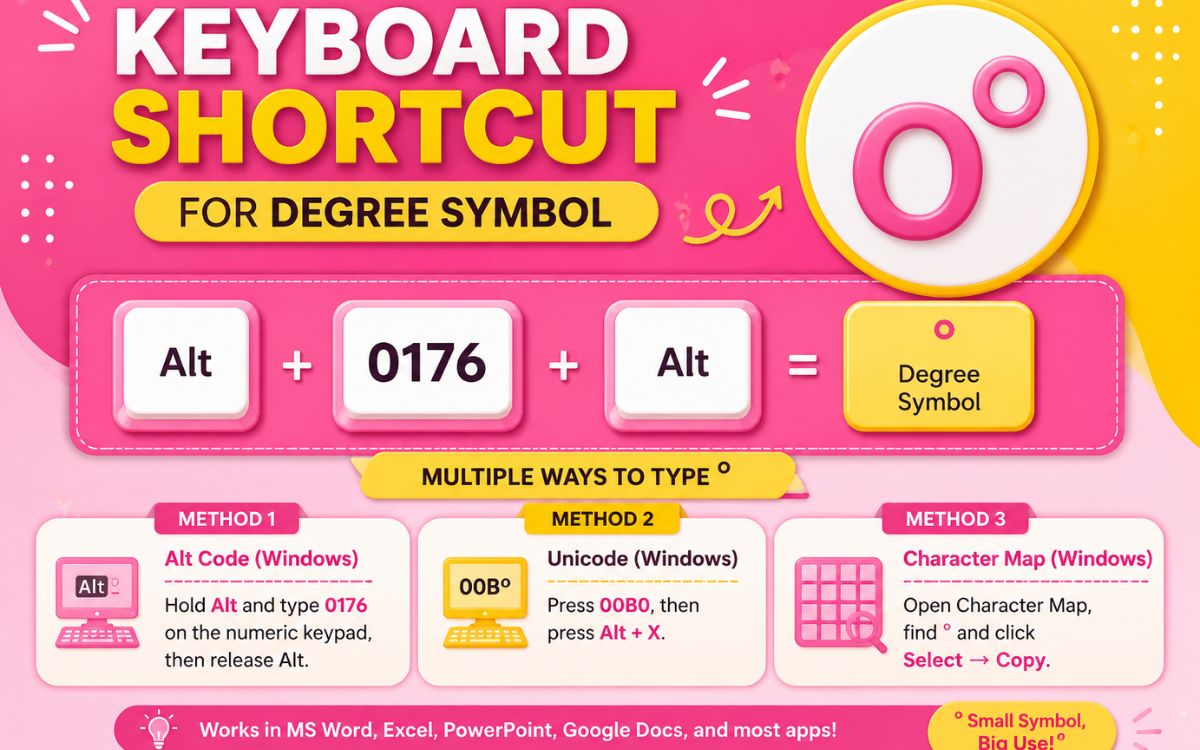
The universal go-to shortcuts are:
- Windows: Alt + 0176 (numeric keypad required, with Num Lock on)
- Mac: Option + Shift + 8
- Word documents: Type 00B0, then immediately press Alt + X
Where Is The Degree Symbol On A Laptop Keyboard?
Most laptops don’t have a physical numeric keypad, which makes Alt + 0176 tricky. Here’s how to work around it:
- Check for a hidden numpad some laptops embed number keys inside letters like J, K, L, U, I, O. Press Fn + NumLk to activate it.
- If there’s no hidden numpad, use Win + . (period) to open the emoji and symbol panel, then search “degree.”
- Alternatively, open the Character Map from the Start menu, locate the degree sign, and copy it.
- In Microsoft Word, type 00B0 and press Alt + X to convert it instantly.
Degree Symbol Mac
On any Mac: MacBook Air, MacBook Pro, or desktop iMac: the shortcut is the same across every app:
- Press Option (⌥) + Shift + 8
This works in Pages, Safari, Mail, Notes, and virtually anywhere else you can type text on macOS.
How To Type A Degree Symbol?
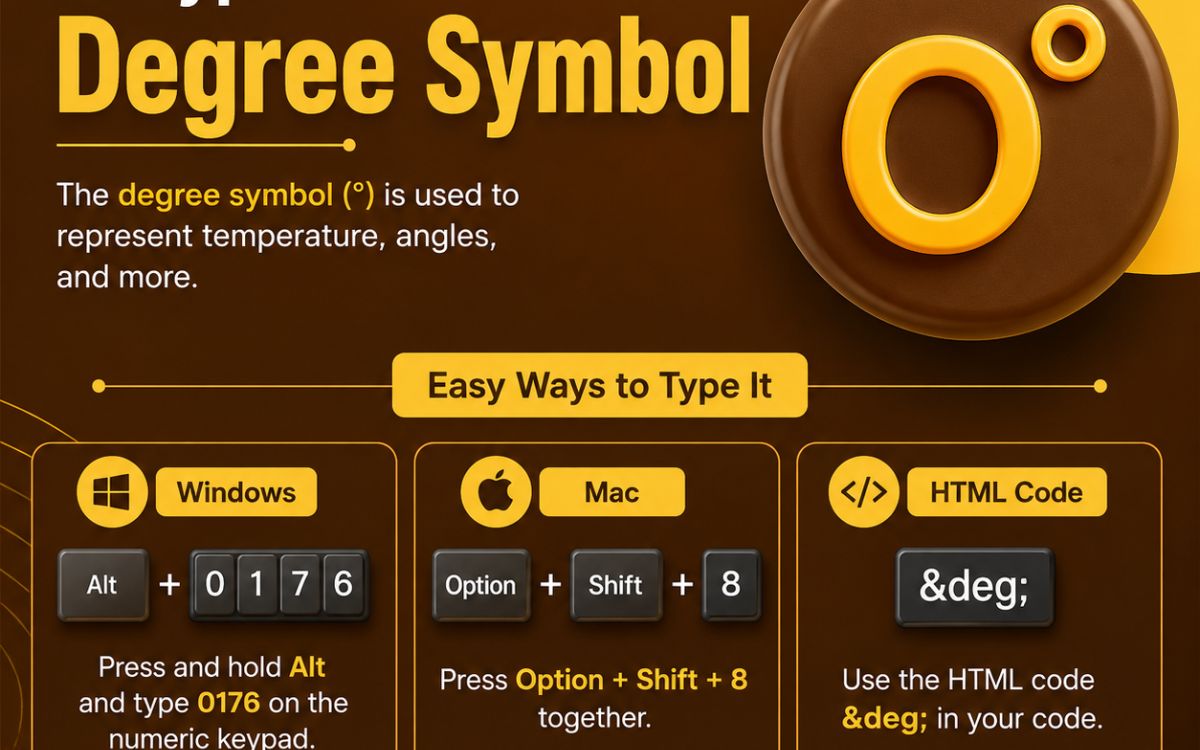
Typing the degree symbol depends on the device you’re using. Here’s the simplest breakdown:
- Windows PC: Alt + 0176 (with Num Lock on and numeric keypad available)
- Mac: Option + Shift + 8
- Word/Excel: Insert > Symbol > More Symbols, then search for character code 00B0
- Website/HTML: Use the HTML entity ° or °
- No keyboard shortcut memory needed: Just copy and paste from the table above
How To Write A Degree Symbol?
If you’re writing by hand, the degree symbol is simply a small circle placed at the top-right of a number, similar in size and position to a superscript character for example, 90° or 75°F. When writing temperatures, most style guides recommend placing the symbol directly against the letter (°F, °C) with no space, while a space is often used between the number and the symbol itself (90 °F), depending on the formatting standard you’re following.
How To Get A Degree Symbol On iPhone?
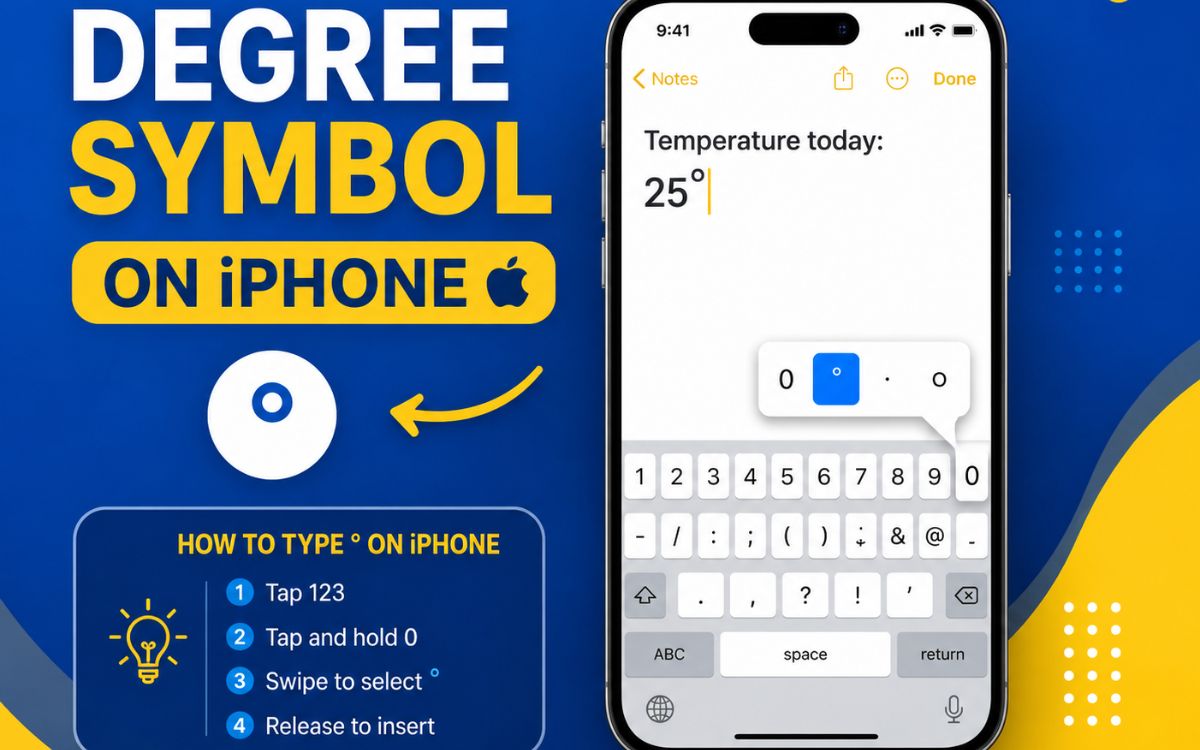
Getting the degree symbol on an iPhone takes just a few taps:
- Open any app where you can type (Messages, Notes, Safari).
- Tap the 123 key to switch to the numbers and symbols keyboard.
- Press and hold the 0 (zero) key.
- A small popup will show the ° symbol. Slide your finger over it and release.
This method works consistently across iOS versions and doesn’t require any settings changes.
Degree Symbol Text
If you need to insert the degree symbol into HTML, CSS, or code, use one of these formats:
| Format | Code |
| HTML Entity | ° |
| HTML Decimal | ° |
| HTML Hex | ° |
| CSS Content | \00B0 |
| Unicode | U+00B0 |
These codes ensure the degree symbol displays correctly across browsers, regardless of the font or device rendering your page.
Frequently Asked Questions
What is the fastest way to type a degree symbol?
The fastest method is copy and paste just grab the ° symbol from a table like the one above and paste it directly into your text.
Is °C or ℃ the correct way to write Celsius?
Both are technically correct, but °C (two separate characters) is more widely supported across fonts and devices than the single ℃ character.
Does the degree symbol need a space before it?
For angles and coordinates, no space is used (90°). For temperatures, some style guides recommend a space (90 °F), though this varies by publication.
How do I type a degree symbol on a Chromebook?
Press Ctrl + Shift + U, then type 00B0, and press Enter or Space to confirm the character.
Can I use the degree symbol in a Word document?
Yes, type 00B0 and press Alt + X, or go to Insert > Symbol > More Symbols and search for character code 00B0.
Why doesn’t Alt + 0176 work on my laptop?
That shortcut requires a numeric keypad, which most laptops lack. Use the Win + . emoji panel or copy-paste instead.
Final Thoughts
The degree symbol may look tiny, but it plays a big role in everything from weather forecasts to geometry homework to your oven’s temperature setting. Whether you prefer copying and pasting directly, using a keyboard shortcut, or typing it manually on your phone, you now have every method covered for Windows, Mac, iPhone, and Android.
Bookmark this page next time you need a quick ° , you’ll never have to search for it twice.
